File_EOF()
… visits


File_EOF(), Bit
|
Value |
Meaning |
|
0 |
No, the end of the file has not been reached. |
|
1 |
Yes, the end of the file has been reached. |
Check if End of File (EOF) is Reached
File_EOF is a variable used to check if the end of a file (EOF) has been reached while reading a file.
When a file is being read, it is important to detect when there is no more data to read, to avoid errors or infinite loops.
File_EOF()
Prevent Blocking Loop with EOF:
File_EOF() is useful to prevent situations where a program might get stuck in an infinite loop if the end of the file is not handled correctly.
By checking File_EOF(), you can safely terminate file reading when all content has been processed.
When to Use:
|
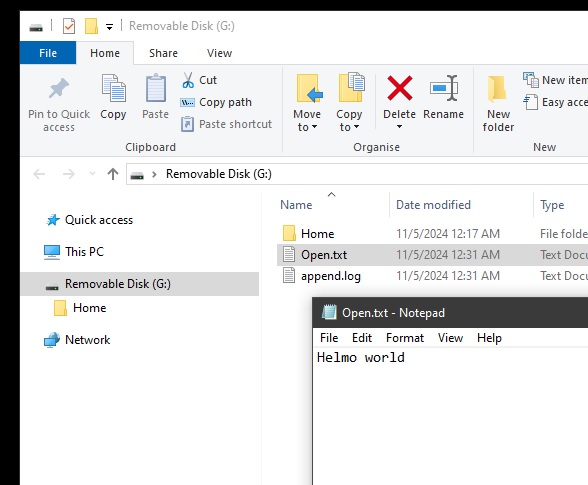
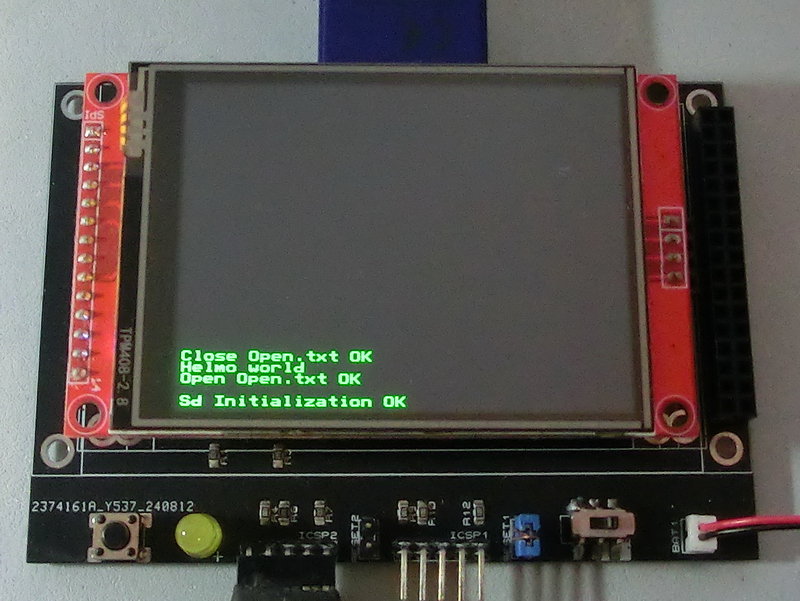
TftSetUp(0, 0) 'Set screen TftResetScreen(BLACK) 'Reset screen TftSetSndFont(0,0) 'Set Font0 While File_Init() <> cErrOK : Wend 'Initialize SD Card TftPrintSndString("Sd Initialization OK",1,0,0,1,GREEN,BLACK,0) 'Confirm Initialize SD Card While File_Open("Open.txt") <> cErrOK : Wend 'Open file Open.txt to edit data TftPrintSndString("Open Open.txt OK",1,0,2,1,GREEN,BLACK,0) 'Confirm Open.txt is open bCounter = 0 'Print position counter Do TftPrintSndChar(File_ReadByte(),1,bCounter,3,1,GREEN,BLACK,0) 'Print data as text If File_EOF() = 1 Then Break 'Loop till end of file Inc bCounter Loop File_Close() 'close file TftPrintSndString("Close Open.txt OK",1,0,4,1,GREEN,BLACK,0) 'Confirm close file |
|
|
Created with the Personal Edition of HelpNDoc: Experience a User-Friendly Interface with HelpNDoc's Documentation Tool