File_ListDir()
… visits


File_ListDir(), String * 8
Result String = name of directory
0 = end of list
String * 8 = directory name
File_ListDir() is a command used to retrieve the name of the directory currently being processed in a sequential list of directories.
It works in conjunction with File_ListReset() and other file listing commands to allow you to loop through directories on an SD card or other storage media.
File_ListDir()
Important Notes:
|
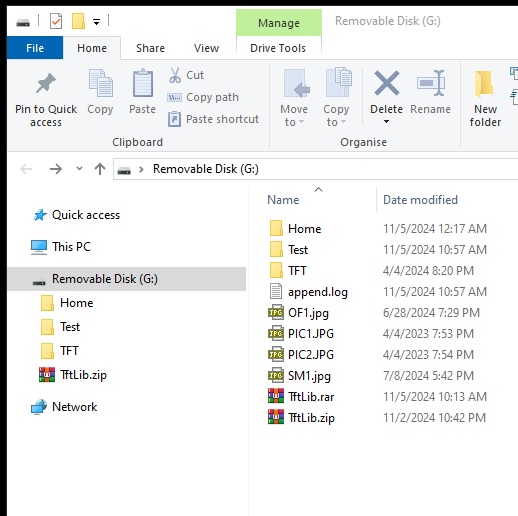
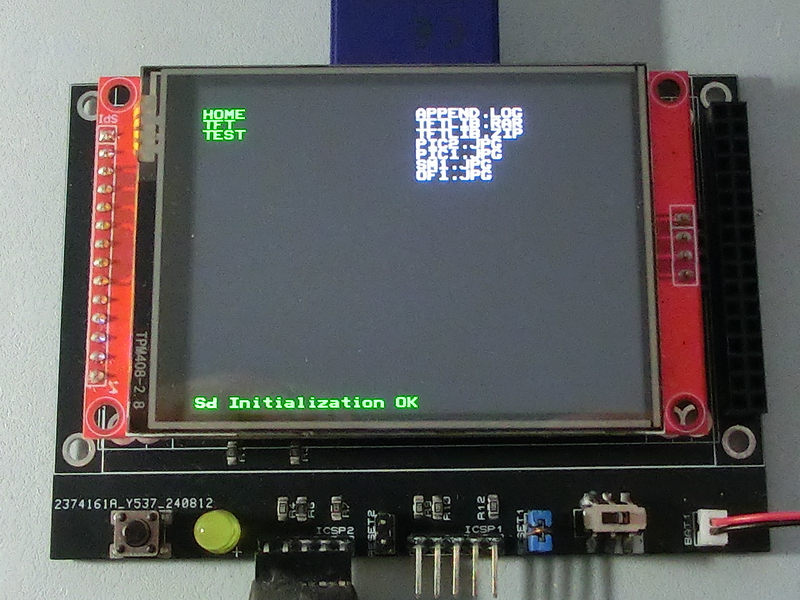
TftSetUp(0, 0) 'Set screen TftResetScreen(BLACK) 'Reset screen TftSetSndFont(0,0) 'Set Font0 While File_Init() <> cErrOK : Wend 'Initialize SD Card TftPrintSndString("Sd Initialization OK",1,0,0,1,GREEN,BLACK,0) 'Confirm Initialize SD Card bCounter = 27 'Vertical print counter File_ListReset() 'Reset file/folder counter Do Clear sString sString = File_ListDir() 'Loop through folder names If sString = 0 Then Break 'Break if end of list TftPrintSndString(sString,1,0,bCounter,1,GREEN,BLACK,0) 'Print folder name Dec bCounter 'Move to next print line Loop bCounter = 27 'Vertical print counter File_ListReset() 'Reset file/folder counter Do 'Loop through file names Clear sString sString = File_ListFile() If sString = 0 Then Break 'Break if end of list TftPrintSndString(sString,1,20,bCounter,1,WHITE,BLACK,0) 'Print folder name Dec bCounter 'Move to next print line Loop |
|
|
Created with the Personal Edition of HelpNDoc: Easy EPub and documentation editor