SdRaw_WriteSector()
… visits


SdRaw_WriteSector(dwSector As Dword), Bit
|
Parameter |
Description |
|
dwSector |
The sector number to which data will be written. |
|
Value |
Meaning |
|
1 |
No errors detected |
|
0 |
Errors detected |
This command writes data to the SD card at the specified sector number (dwSector).
Each sector is 512 bytes. The data to be written must be placed in the global SectorBuffer[512] array, which is already declared in the library, so you don't need to declare it in your program.
SdRaw_WriteSector(305)
|
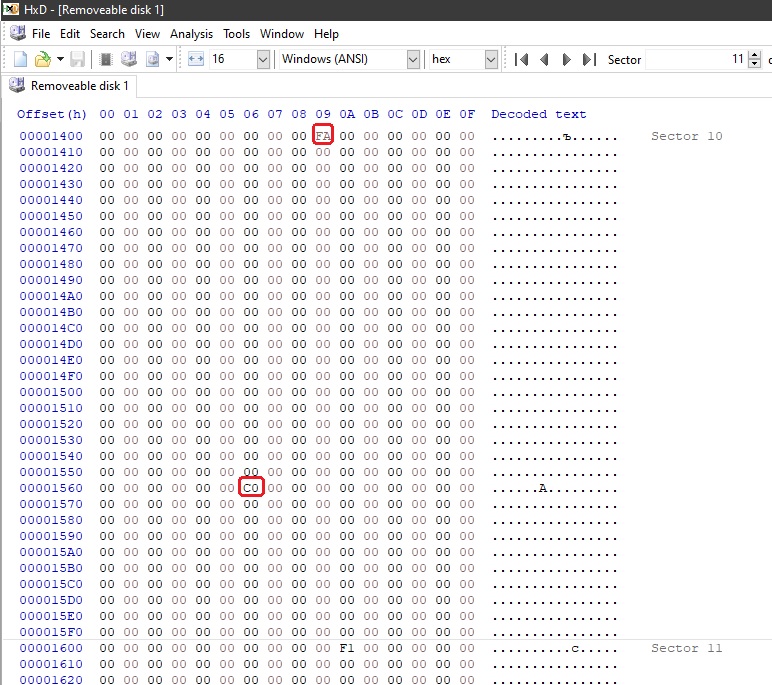
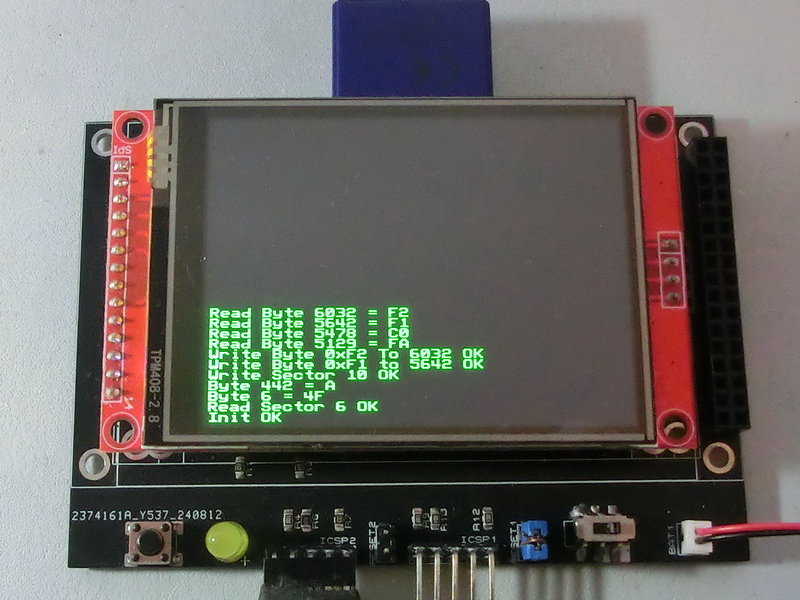
TftSetUp(0, 0) 'Set Screen TftResetScreen(BLACK) 'Reset screen While SdRaw_Init() <> 1 : Wend 'Initialize card TftPrintSndString("Init OK",1,0,0,1,GREEN,BLACK,0) 'Confirm initialization If SD_ReadSector(6) = 1 Then 'Read Sector 6 TftPrintSndString("Read Sector 6 OK",1,0,1,1,GREEN,BLACK,0) 'Confirm Read Sector 6 Else TftPrintSndString("Read Sector 6 Fail",1,0,1,1,GREEN,BLACK,0) EndIf TftPrintSndString("Byte 6 = " + Str$(Hex SectorBuffer[6]),1,0,2,1,GREEN,BLACK,0) 'Display byte 6 from the sector buffer TftPrintSndString("Byte 442 = " + Str$(Hex SectorBuffer[442]),1,0,3,1,GREEN,BLACK,0) 'Display byte 442 from the sector buffer Clear SectorBuffer : SectorBuffer[9] = 0xFA : SectorBuffer[358] = 0xC0 'Clear sector buffer and load some values If SD_WriteSector(10) = 1 Then 'Write buffer to sector 10 TftPrintSndString("Write Sector 10 OK",1,0,4,1,GREEN,BLACK,0) 'Confirm write to sector 10 Else TftPrintSndString("Write Sector 10 Fail",1,0,4,1,GREEN,BLACK,0) EndIf If SdRaw_WriteByte(0xF1, 5642) = 1 Then 'Write byte 0xF1 to position 5642 TftPrintSndString("Write Byte 0xF1 to 5642 OK",1,0,5,1,GREEN,BLACK,0) 'Confirm write Byte 0xF1 to position 5642 Else TftPrintSndString("Write Byte 0xF1 to 5642 Fail",1,0,5,1,GREEN,BLACK,0) EndIf If SdRaw_WriteByte(0xF2, 6032) = 1 Then 'Write byte 0xF2 to position 6032 TftPrintSndString("Write Byte 0xF2 To 6032 OK",1,0,6,1,GREEN,BLACK,0) 'Confirm write Byte 0xF2 to position 6032 Else TftPrintSndString("Write Byte 0xF2 To 6032 Fail",1,0,6,1,GREEN,BLACK,0) EndIf TftPrintSndString("Read Byte 5129 = " + Str$(Hex SdRaw_ReadByte(5129)),1,0,7,1,GREEN,BLACK,0) 'Read and display byte 5129 TftPrintSndString("Read Byte 5478 = " + Str$(Hex SdRaw_ReadByte(5478)),1,0,8,1,GREEN,BLACK,0) 'Read and display byte 5478 TftPrintSndString("Read Byte 5642 = " + Str$(Hex SdRaw_ReadByte(5642)),1,0,9,1,GREEN,BLACK,0) 'Read and display byte 5642 TftPrintSndString("Read Byte 6032 = " + Str$(Hex SdRaw_ReadByte(6032)),1,0,10,1,GREEN,BLACK,0) 'Read and display byte 6032 |
|
|
Created with the Personal Edition of HelpNDoc: Transform Your Documentation Workflow with HelpNDoc's Intuitive UI