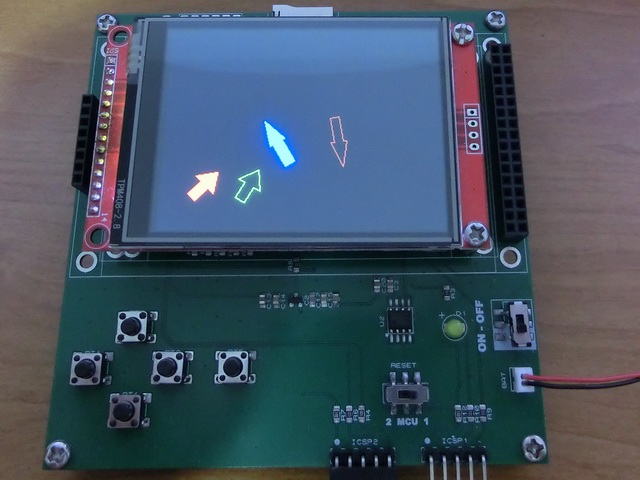
TftArrow()
… visits


TftArrow(wX_Center As Word, wY_Center As Word, wLength As Word, wAngleDeg As Word, bShaftWidth As Byte, wHeadLength As Word, bHeadWidth As Byte, pSolid As Bit, wColor As Word)
|
Parameter |
Description |
|
wX_Center |
X-coordinate of the arrow center. |
|
wY_Center |
Y-coordinate of the arrow center. |
|
wLength |
total tail-to-tip length (center-to-tip = center-to-tail = wLength/2) |
|
wAngleDeg |
pointing angle in degrees, 0-359 (wraps automatically if given a larger value) |
|
bShaftWidth |
shaft width |
|
wHeadLength |
length of the head, measured back from the tip |
|
bHeadWidth |
width of the head's base |
|
pSolid |
0 = outline only, 1 = filled |
|
wColor |
16-bit RGB565 color |
Draws an arrow with a triangular head and a rectangular shaft
Draws an arrow with a triangular head and a rectangular shaft, centered on and rotating around wX_Center/wY_Center - the arrow's midpoint sits at the center, with tip and tail both swinging around it as wAngleDeg changes, like a compass needle or clock hand.
|
TftSetUp(0, 0) TftResetScreen(BLACK) TftArrow(50,50,40,45,10,20,30,1,RED) TftArrow(100,50,40,60,10,20,30,0,GREEN) TftArrow(130,100,60,120,10,30,20,1,BLUE) TftArrow(200,100,60,280,10,30,20,0,BROWN) |
|
Created with the Personal Edition of HelpNDoc: Streamline Your Documentation Process with HelpNDoc's Project Analyzer