TftPrintSndInteger()
… visits


TftPrintSndInteger(sdInteger As SDword, bDigits As Byte, bFontSize As Byte, wX_Pos As Word, wY_Pos As Word, pPosition As Bit, wForeColor As Word, wBackColor As Word, pTransparent As Bit)
|
Parameter |
Description |
|
sdInteger |
signed integer value to print |
|
bDigits |
number of significant digits to print |
bFontSize — font size
wX_Pos — x position (absolute) for the lower left corner of the first character
wY_Pos — y position (absolute) for the lower left corner of the first character
pPosition — position type for the lower left corner of the character
wForeColor — character color in 16-bit RGB565 format - used for the glyph pixels
wBackColor — background color in 16-bit RGB565 format - used for empty pixels within the glyph's bounding box
pTransparent — transparency option
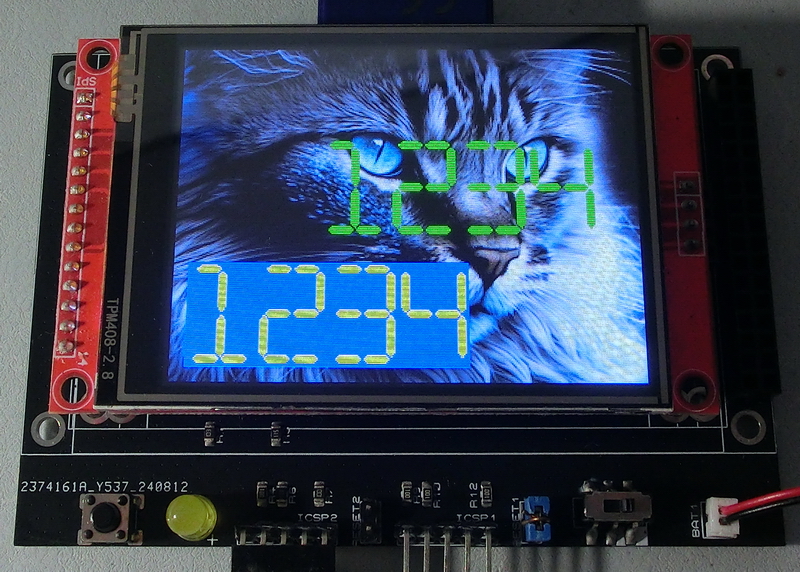
Prints a signed integer using an SND font.
TftPrintSndInteger(-12345, 7, 2, 1, 1, 0, WHITE, BLACK, 0)
-Background color (wBackColor) will be ignored if transparency is enabled, and only the pixels from the glyph will be printed.
However, this approach is slower than using a background color.
-For specific formatting, you can use built-in functions in Positron's Str$... and print the resulting string using TftPrintSndString().
-Refer to TftPrintBdfInteger() and TftPrintSndString() for example parameter usage.
|
$define FontSmooth 0 $define FontMaxSpace 16 $define FontMaxPixels 16 Include "TftLib\Fonts\SND\F51_SND_48x72_Digits_Sixteen_Segment.inc" Include "TftLib\TFT_Graphic_Lib.inc" '... TftSetUp(0, 0) TftSetSndFont(51,0) TftBmpFromSD("Cat.BMP", 0,0) TftPrintSndInteger(1234, 0, 0, 10, 10, 0, YELLOW, BLUE, 0) TftPrintSndInteger(1234, 0, 0, 100, 100, 0, GREEN, BLUE, 1) |
|
Created with the Personal Edition of HelpNDoc: Converting Word Docs to eBooks Made Easy with HelpNDoc