Font Converter Tool
(Current version 1.03)
Ttf_Bdf_Flash.exe is a tool for converting any TTF font into a BDF file and generating bitmapped memory HEX data sets for use in your program.
In the previous TFT Graphic Library 1, the tool depended on an external program to convert a TTF font into BDF format before it could be processed further.
This approach was cumbersome and involved too many steps, including installing additional software and manually performing the intermediate conversion.
This is no longer necessary. A specially compiled version of the Linux converter otf2bdf.exe is now integrated directly into Ttf_Bdf_Flash.exe, eliminating the external dependency.
The Font Converter Tool now supports “one-click” conversion, allowing you to batch-convert multiple fonts with optional features such as font preview and character-range clipping to any desired ASCII subset.
Important Requirements
Before using the tool, you may need to install:
- Microsoft .NET Framework 4.8 (if not already installed)
- Microsoft Visual C++ Redistributable (may also be required, depending on your system)
- Additionally, any TTF file you wish to convert must first be copied into the folder: TftLib\Tools\Ttf_Bdf_Flash_Converter\TEMP - This is required as a safety measure to prevent accidental deletion or modification of your original font files.
Tool Location and Output Files
- You can find Ttf_Bdf_Flash.exe in: TftLib\Tools\Ttf_Bdf_Flash_Converter
- After conversion, output files are stored in the same directory under the TEMP folder, which contains two subfolders:
- BDF — Contains interm
- INC — Contains the final output files in bitmap HEX table format
To make these INC files accessible to TFT_Graphic_Lib.exe and available for inclusion in your main program, you must move them to: TftLib\Fonts\BDF
In addition, the folder TftLib\Fonts\TTF contains approximately 4000 TTF fonts you can experiment with.
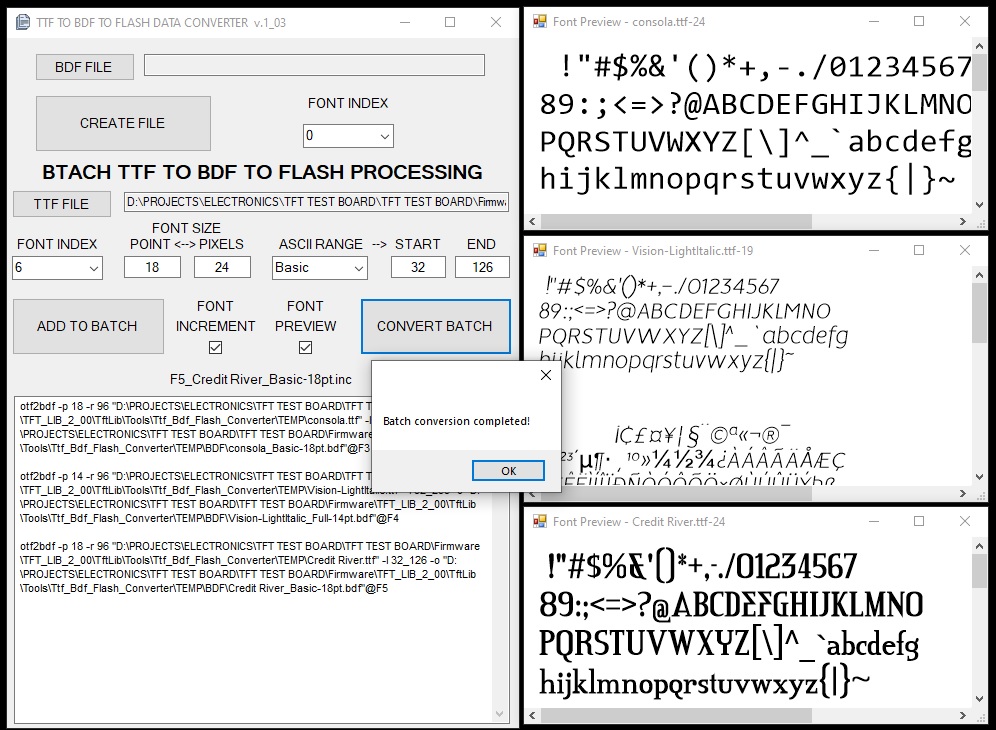
Ttf_Bdf_Flash.exe – Graphical User Interface
- Upper Section — Legacy BDF-to-Flash Converter - the top portion of the GUI represents the older tool, which converts a BDF file directly into flash-ready data. This section is now considered deprecated, as the batch TTF conversion system below is more powerful and convenient:
- BDF FILE — Select the BDF file to convert.
- FONT INDEX — The library supports up to 9 BDF fonts that can be included and dynamically selected when printing text or numbers.
- CREATE FILE — Converts the selected BDF file into Flash tables for inclusion in your project.
- Batch TTF → BDF → Flash Processing (Primary Tool) - This improved and more versatile functionality is located in the lower portion of the GUI under the title “BATCH TTF TO BDF TO FLASH PROCESSING”.
- TTF FILE - Click to open any TTF font.
- FILE FOLDER - Displays the directory containing the selected TTF file.
- FONT INDEX - Select the index to assign to the converted font. Valid range: 0 to 255. You may assign:
- The same font to multiple indexes with different settings
- Different fonts to the same index
- Any combination of fonts and sizes
However, your program cannot include multiple fonts with the same index, since the index is used to switch fonts dynamically during runtime.
- FONT SIZE - Select the font size in either points or pixels. This is a complex subject, especially for TFT screens, and you can read more online if needed. Meaningful values are typically 10 to 100.
- ASCII RANGE - Specifies which glyphs (characters) to include in the final font. Options include preset and user-defined ranges:
- Basic — ASCII 32–126 (letters, digits, common symbols)
- Full — ASCII 32–255 (full extended ASCII set)
- Digits — ASCII 46–57 (digits and decimal point)
- Math — ASCII 42–62 (digits, dot, basic math symbols)
- Lower — ASCII 97–122 (lowercase letters)
- UPPER — ASCII 65–90 (uppercase letters)
- Custom — Enter any custom ASCII start and end values
- START — Start of the ASCII range
- END — End of the ASCII range
- FONT INCREMENT - When enabled, increments the font index automatically each time a job is added to the batch.
- FONT PREVIEW - When enabled, a preview window opens after selecting a TTF file. The preview displays only the selected ASCII range rendered at the chosen font size.
- ADD TO BATCH - Adds the current font configuration to the batch processing queue.
- CONVERT BATCH - Converts all queued jobs in sequence.
- BATCH WINDOW - Displays the list of pending batch conversion tasks (CLIs). To remove a job, simply delete its corresponding entry in the list.
Created with the Personal Edition of HelpNDoc: Easily create EPub books