Button
Syntax
Button Pin, DownState, Delay, Rate, Workspace, TargetState, Label
Overview
Debounce button input, perform auto-repeat, and branch to address if button is in target state. Button circuits may be active-low or active-high.
Parameters
Pin is a Port.Bit, constant, or variable (0 - 15), that specifies the I/O pin to use. This pin will automatically be set to input. DownState is a variable, constant, or expression (0 or 1) that specifies which logical state occurs when the button is pressed. Delay is a variable, constant, or expression (0 - 255) that specifies how long the button must be pressed before auto-repeat starts. The delay is measured in cycles of the Button routine. Delay has two special settings: 0 and 255. If Delay is 0, Button performs no debounce or autorepeat. If Delay is 255, Button performs debounce, but no auto-repeat. Rate is a variable, constant, or expression (0 – 255) that specifies the number of cycles between auto-repeats. The rate is expressed in cycles of the Button routine. Workspace is a byte variable used by Button for workspace. It must be cleared to 0 before being used by Button for the first time and should not be adjusted outside of the Button command. TargetState is a variable, constant, or expression (0 or 1) that specifies which state the button should be in for a branch to occur. (0 = not pressed, 1 = pressed). Label is a label that specifies where to branch if the button is in the target state.
Example
  Device = 24FJ64GA002               ' Select the device to compile for
  Declare Xtal = 8
  Declare Hserial_Baud = 9600        ' USART1 Baud rate
  Declare Hrsout1_Pin = PORTB.14     ' Select the pin for TX with USART1

  Dim BtnVar as Byte                   ' Workspace for Button command

  RPOR7 = 3                           ' Make PPS Pin RP14 U1TX

  Do
     ' Go to NoPress unless BtnVar = 0.
     Button 0, 0, 255, 250, BtnVar, 0, NoPress
     HrsoutLn "*"
NoPress:
  Loop
Notes.
When a button is pressed, the contacts make or break a connection. A short (1 to 20ms) burst of noise occurs as the contacts scrape and bounce against each other. Button’s debounce feature prevents this noise from being interpreted as more than one switch action.
Button also reacts to a button press the way a computer keyboard does to a key press. When a key is pressed, a character immediately appears on the screen. If the key is held down, there’s a delay, then a rapid stream of characters appears on the screen. Button’s auto-repeat function can be set up to work much the same way.
Button is designed for use inside a program loop. Each time through the loop, Button checks the state of the specified pin. When it first matches DownState, the switch is debounced. Then, as dictated by TargetState, it either branches to address (TargetState = 1) or doesn’t (Target- State = 0).
If the switch stays in DownState, Button counts the number of program loops that execute. When this count equals Delay, Button once again triggers the action specified by TargetState and address. Thereafter, if the switch remains in DownState, Button waits Rate number of cycles between actions. The Workspace variable is used by Button to keep track of how many cycles have occurred since the pin switched to TargetState or since the last auto-repeat.
Button does not stop program execution. In order for its delay and auto repeat functions to work properly, Button must be executed from within a program loop.
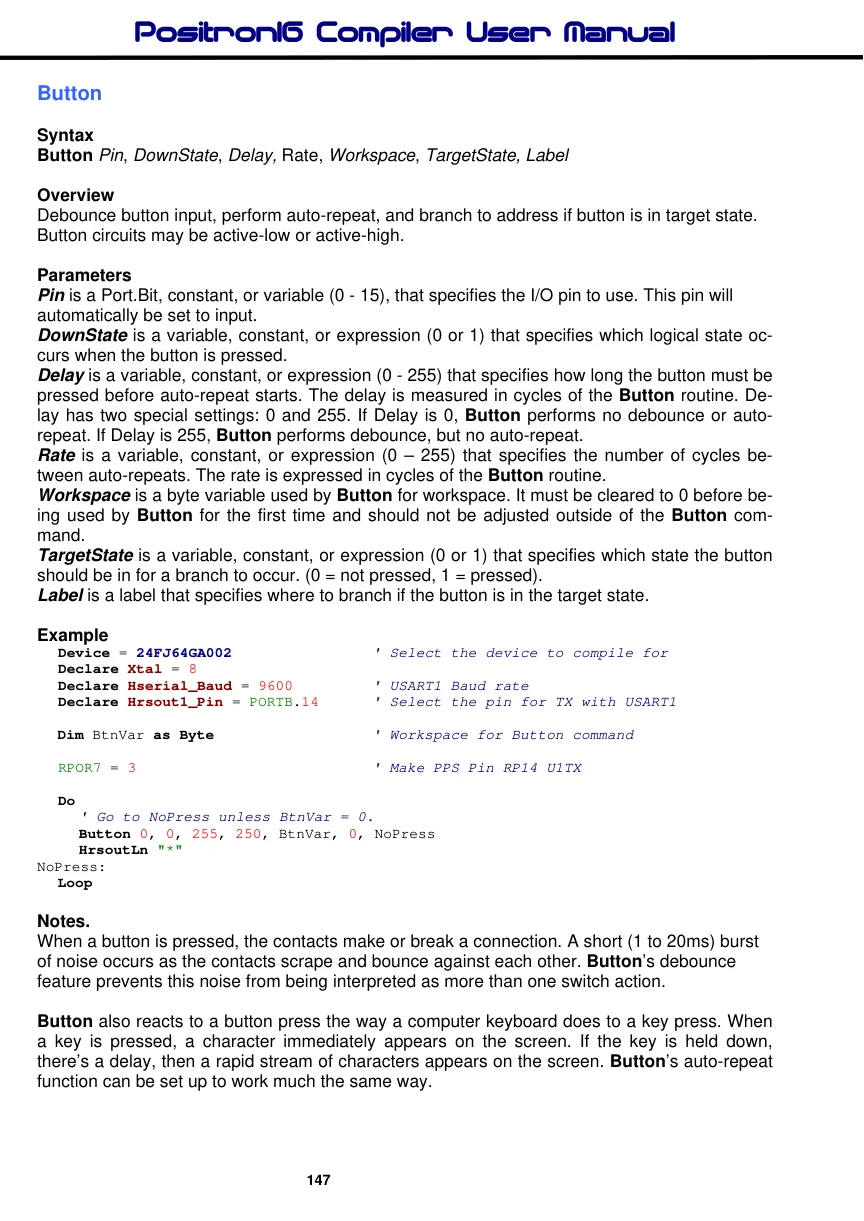
Two suitable circuits for use with Button are shown below.