ADin
Syntax
Variable = ADin channel number
Overview
Read the value from the on-board Analogue to Digital Converter.
Parameters
Variable is a user defined variable. Channel number can be a constant or a variable expression.
Example
' Read the value from AN0 of the ADC and place in variable ADC_Result.
  Device = 18F26K40             ' Select the device to compile for
  Declare Xtal = 16  ' Tell the compiler the device will be operating at 16MHz
  Declare Hserial_Baud = 9600  ' Set the Baud rate for HRsoutLn

  Declare ADin_Tad = FRC       ' RC oscillator chosen for the ADC
  Declare ADin_Stime = 50    ' Allow 50us sample time

  Dim wADC_Result as Word    ' Create a word variable to hold the ADC value

  ADCON0bits_ADFM = 1          ' Set the ADC to give a 10-bit result
  ANSELA = 0b00000001         ' Set analogue input on PORTA.0
  wADC_Result = ADin 0         ' Place the A\D conversion into variable wADC_Result
   HRsoutLn Dec wADC_Result   ' Transmit the decimal ADC value
ADin Declares
There are two Declare directives for use with ADin. These are: -
Declare ADin_Tad 2_FOSC, 8_FOSC, 32_FOSC, 64_FOSC, or FRC. Sets the ADC's clock source.
All compatible devices have four options for the clock source used by the ADC. 2_FOSC, 8_FOSC, 32_FOSC, and 64_FOSC are ratios of the external oscillator, while FRC is the PICmicro's internal RC oscillator. Instead of using the predefined names for the clock source, values from 0 to 3 may be used. These reflect the settings of bits 0-1 in register ADCON0.
Care must be used when issuing this Declare, as the wrong type of clock source may result in poor resolution, or no conversion at all. If in doubt use FRC which will produce a slight reduction in resolution and conversion speed, but is guaranteed to work first time, every time. FRC is the default setting if the Declare is not issued in the BASIC listing. The Adin_Tad declare is only for the older microcontrollers, because the new microcontrollers have a far more complex setup mechanism for the ADC, so a procedure will need to be created to load all the SFRs associated with the ADC peripheral.
Declare ADin_Stime 0 to 65535 microseconds (us). Allows the internal capacitors to fully charge before a sample is taken. This may be a value from 0 to 65535 microseconds (us).
A value too small may result in a reduction of resolution. While too large a value will result in poor conversion speeds without any extra resolution being attained.

A typical value for ADin_Stime is 50 to 100. This allows adequate charge time without loosing too much conversion speed. But experimentation will produce the right value for your particular requirement. The default value if the Declare is not used in the BASIC listing is 50.
Notes
Before the ADin command may be used, the appropriate TRIS register must be manipulated to set the desired pin to an input. Also, the ADCON1 register must be set according to which pin is required as an analogue input, and in some cases, to configure the format of the conversion's result. See the numerous Microchip datasheets for more information on these registers and how to set them up correctly for the specific device used.
If multiple conversions are being implemented, then a small delay should be used after the ADin command. This allows the ADC's internal capacitors to discharge fully: -
Do
  wADC_Result = ADin 3 ' Place the conversion into variable wADC_Result
  DelayUs 2             ' Wait for 2us
Loop                    ' Read the ADC forever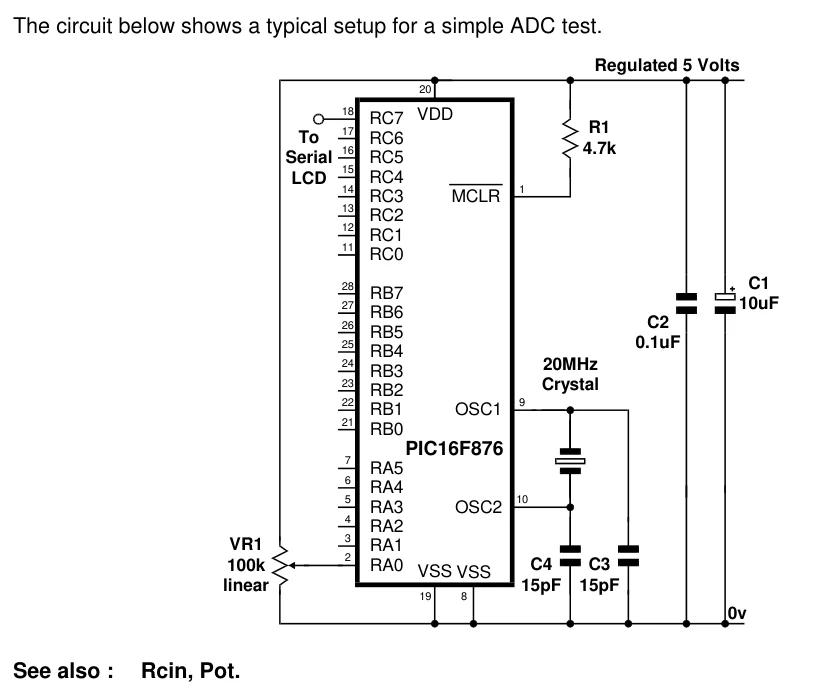
Text in this figure or table
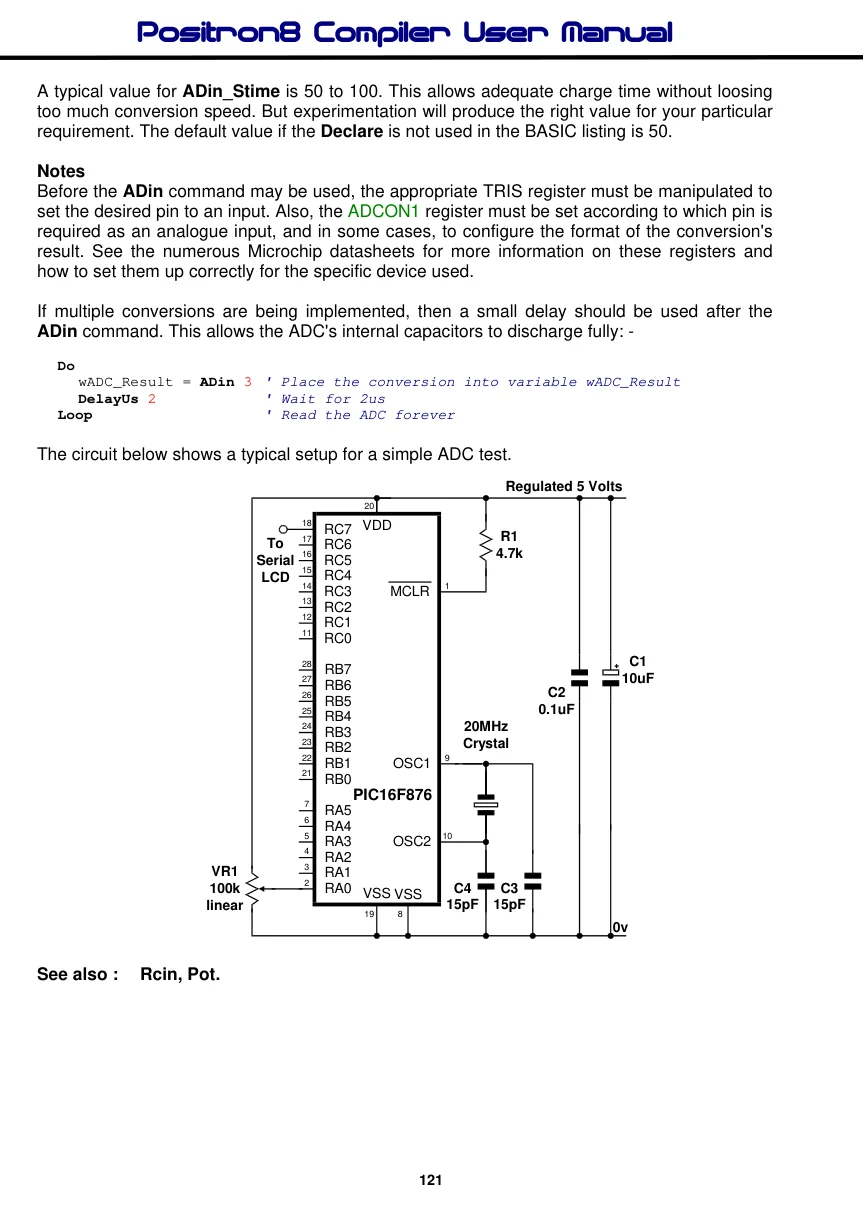
The circuit below shows a typical setup for a simple ADC test.
Regulated 5 Volts 20
18 VDD
RC7
| 17 | R1 |
| To | RC6 |
| 16 | 4.7k |
| Serial | RC5 |
15 RC4 LCD
| 14 | 1 |
| RC3 | MCLR |
13 RC2 12 RC1 11 RC0
28 C1
RB7
27 10uF
RB6 C2 26 RB5
25 0.1uF
RB4
24 20MHz
RB3
23 Crystal
RB2
| 22 | 9 |
| RB1 | OSC1 |
21 RB0 PIC16F876 7 RA5 6 RA4
| 5 | 10 |
| RA3 | OSC2 |
4 RA2 3
VR1 RA1
2
100k RA0 C4 C3
VSS VSS
| linear | 15pF 15pF |
| 19 | 8 |
0v