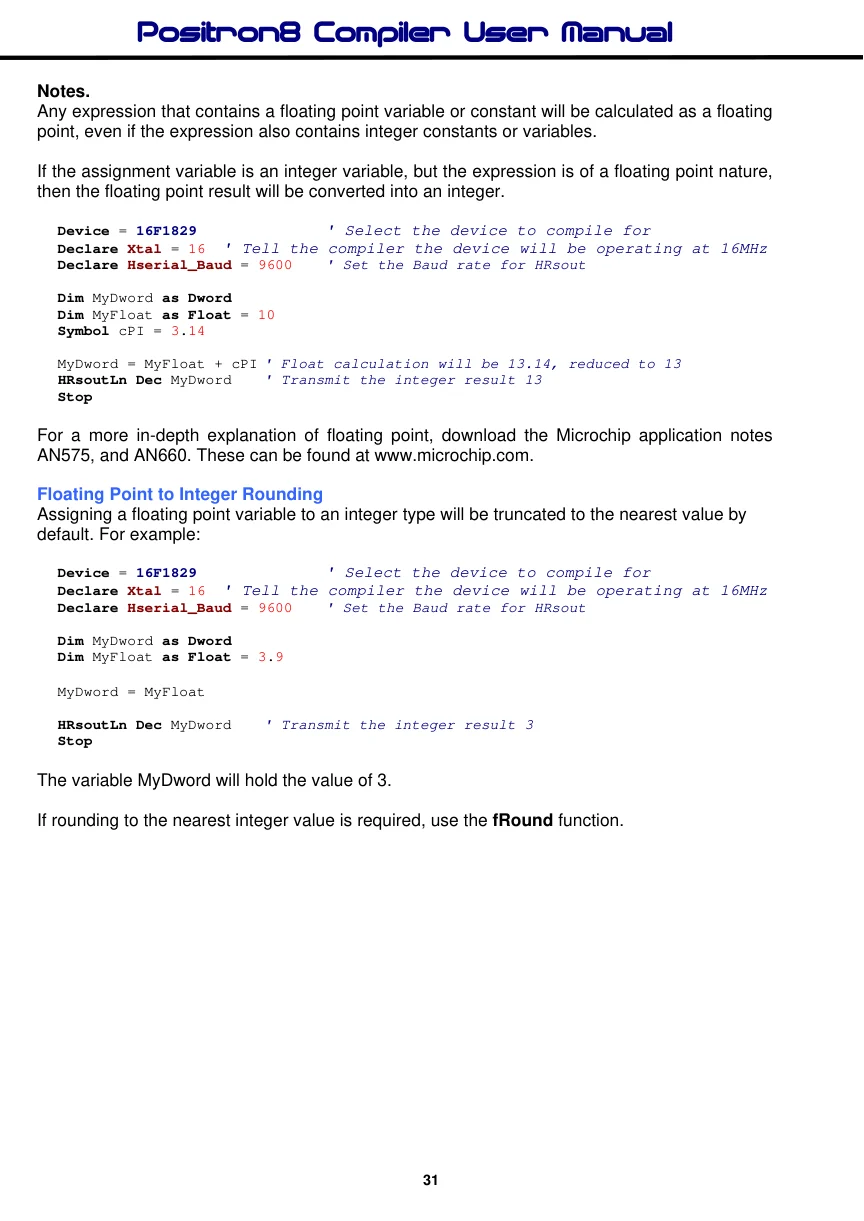
Floating Point Mathematics
The Positron8 compiler can perform 32-bit, IEEE 754 'Compliant' Floating Point calculations.
Declaring a variable as Float will enable floating point calculations on that variable.
Dim MyFloat as FloatTo create a floating point constant, add a decimal point. Especially if the value is a whole number.
Symbol cPI = 3.14   ' Create an obvious floating point constant

Symbol cFlNum = 5.0  ' Create a floating point value of a whole number
Note. Floating point arithmetic is not the ultimate in accuracy, it is merely a means of compressing a complex or large value into a small space (4 bytes in the compiler's case). Perfectly adequate results can usually be obtained from correct scaling of integer variables, with an increase in speed and a saving of RAM and code space. 32-bit floating point math is extremely microcontroller intensive since the PICmicro™ is only an 8-bit processor. It also consumes quite large amounts of RAM, and code space for its operation, therefore always use floating point sparingly, and only when strictly necessary. Floating point is not available on 12-bit core PICmicros because of memory restrictions, and is most efficient when used with 18F devices because of the more linear code and RAM specifications. For faster operation using Floating Point, use a PIC24™ or dsPIC33™ device with the Positron16 compiler. The Positron16 also supports 64-bit Floating Point variables, named as Double types. These offer excellent accuracy.
Floating Point Format
The Positron8 compiler uses the Microchip™ variation of IEEE 754 floating point format. The differences to standard IEEE 745 are minor, and well documented in Microchip™ application note AN575 (downloadable from www.microchip.com).
Floating point numbers are represented in a modified IEEE-754 format. This format allows the floating-point routines to take advantage of the PICmicro's architecture and reduce the amount of overhead required in the calculations. The representation is shown below compared to the IEEE-754 format: where s is the sign bit, y is the LSB of the exponent and x is a placeholder for the mantissa and exponent bits.
The two formats may be easily converted from one to the other by manipulation of the Exponent and Mantissa 0 bytes. The following shows an example of this operation.
| Format | Exponent | Mantissa 0 | Mantissa 1 | Mantissa 2 |
| IEEE-754 | sxxx xxxx | yxxx xxxx | xxxx xxxx | xxxx xxxx |
| Microchip xxxx xxxy | sxxx xxxx | xxxx xxxx | xxxx xxxx |
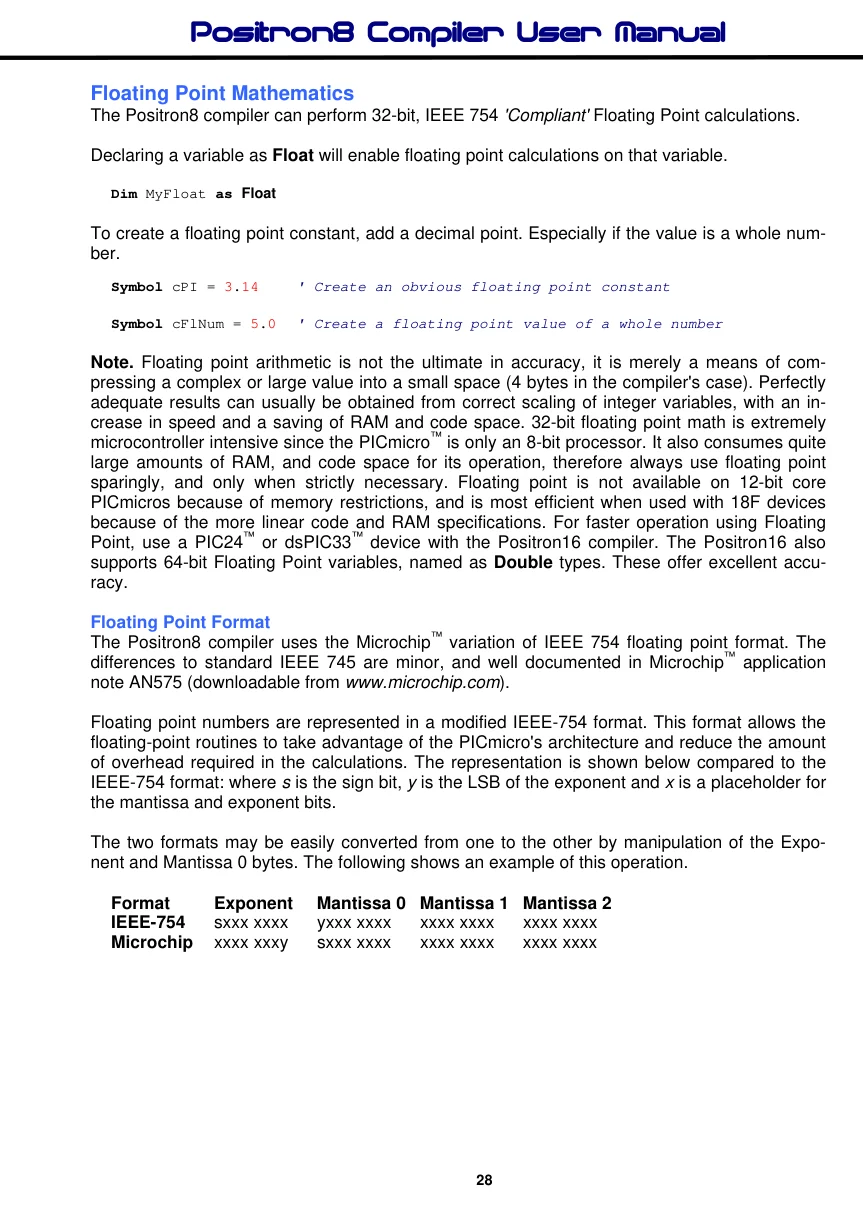
Example:
' Convert IEEE-754 to Microchip floating point and vice-versa

    Device = 18F26K40     ' Select the device to compile for
    Declare Xtal = 16     ' Tell the compiler the device will be operating at 16MHz
'
' Create a variable for the demo
'
    Dim MyFloat As Float = 3.14  ' Create a floating point variable and pre-load it

'-------------------------------------------------------------------------------
' Convert the IEEE-754 variable passed, to a Microchip format
' Input     : pVar holds the IEEE-754 format floating point variable
' Output    : pVar will be converted to Microchip format

' Notes     : pVar must be a Float type variable and not a constant value
'
$define IEEE754_MChip(pVar) '
    Rol pVar.Byte1          '
    Rol pVar.Byte0          '
    Ror pVar.Byte1

'-------------------------------------------------------------------------------
' Convert the Microchip variable passed, to an IEEE-754 format
' Input     : pVar holds the Microchip format floating point variable
' Output    : pVar will be converted to IEEE-754 format
' Notes     : pVar must be a Float type variable and not a constant value
'
$define MChip_IEEE754(pVar) '
    Rol pVar.Byte1          '
    Ror pVar.Byte0          '
    Ror pVar.Byte1

'---------------------------------------------------------------------------------
' Demo to convert Microchip and IEEE-754 floating point formats
'
Main:
    MChip_IEEE754(MyFloat)       ' Convert MyFloat to IEEE-754 format
    IEEE754_MChip(MyFloat)       ' Convert MyFloat back to Microchip format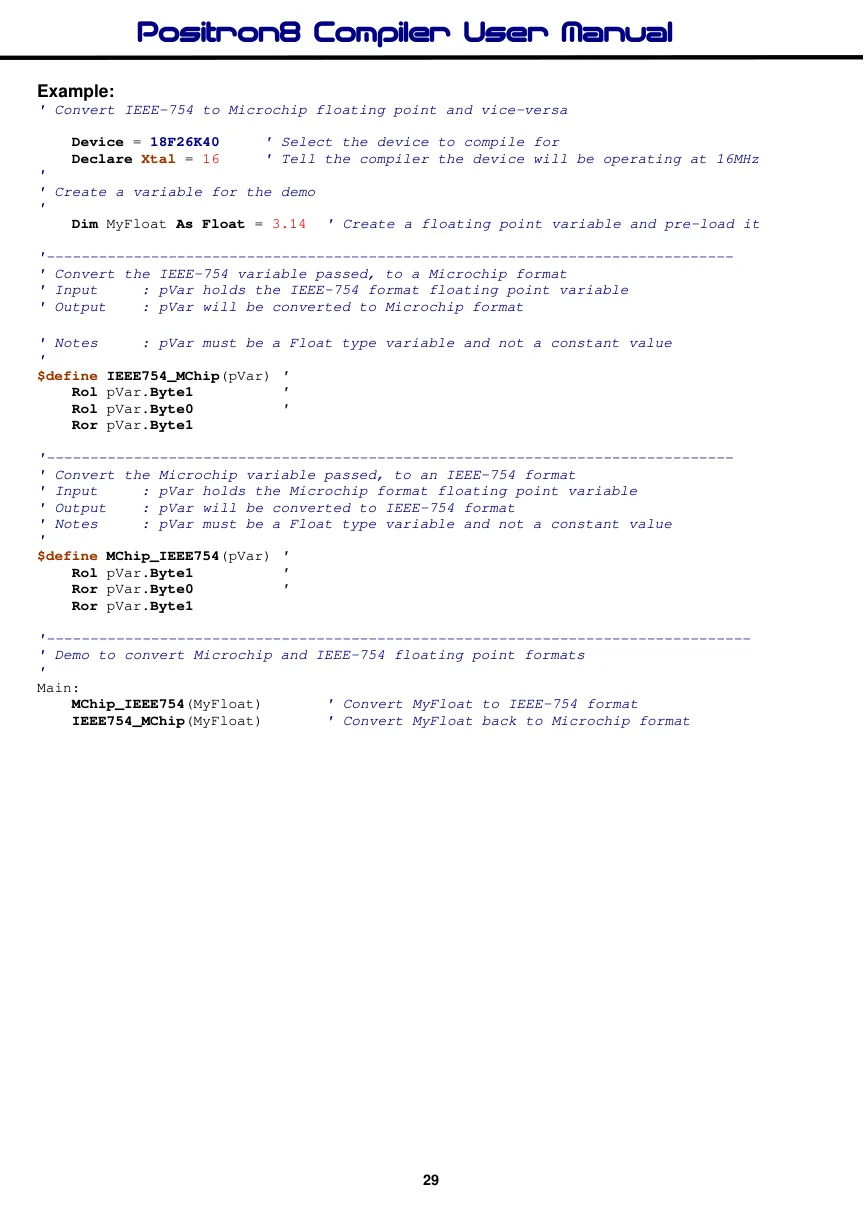
System variables Used by the Floating Point Libraries.
Several 8-bit RAM registers are used by the mathematic routines to hold the operands for, and results of floating point operations. Since there may be two operands required for a floating point operation (such as multiplication or division), there are two sets of exponent and mantissa registers reserved (A and B). For argument A, PP_AARGHHH holds the exponent and
PP_AARGHH, PP_AARGH and PP_AARG hold the mantissa. For argument B,
PP_BARGHHH holds the exponent and PP_BARGHH, PP_BARGH and PP_BARG hold the mantissa.
Floating Point Example Programs.
' Multiply two floating point values
  Device = 18F25K20            ' Select the device to compile for
  Declare Xtal = 16  ' Tell the compiler the device will be operating at 16MHz
  Declare Hserial_Baud = 9600   ' Set the Baud rate for HRsout

  Dim MyFloat as Float
  Symbol cFlNum = 1.234          ' Create a floating point constant value

  MyFloat = cFlNum * 10
  HRsoutLn Dec MyFloat
  Stop

' Add two floating point variables
  Device = 18F25K20            ' Select the device to compile for
  Declare Xtal = 16  ' Tell the compiler the device will be operating at 16MHz
  Declare Hserial_Baud = 9600   ' Set the Baud rate for HRsout

  Dim MyFloat as Float
  Dim Flt1 as Float = 1.23
  Dim Flt2 as Float = 1000.1

  MyFloat = Flt1 + Flt2
  HRsoutLn Dec MyFloat
  Stop

' A digital volt meter using the on-board ADC
  Device = 16F1829               ' Select the device to compile for
  Declare Xtal = 16  ' Tell the compiler the device will be operating at 16MHz
  Declare Hserial_Baud = 9600   ' Set the Baud rate for HRsout

  Declare ADin_Tad = cFRC       ' RC OSC chosen for the ADC
  Declare ADin_Delay = 50       ' Allow 50us sample time

  Dim ADC_wRaw as Word
  Dim fVolts   as Float
  Symbol cQuanta = (5.0 / 1024)  ' Calculate the quantising value for 10-bits

  ADCON1bits_ADFM = 1           ' Set the ADC result as 10-bits
  ANSELA = 0b00000001          ' Set for analogue input on pin AN0 (PORTA.0)

  Do                             ' Create a loop
     ADC_wRaw = ADin 0          ' Get an ADC reading
     fVolts = ADC_wRaw * cQuanta  ' Convert it to a Voltage value
     HRsoutLn Dec2 fVolts, "V"   ' Transmit the decimal volts to a serial terminal
     DelayMs 300
  Loop                           ' Do it forever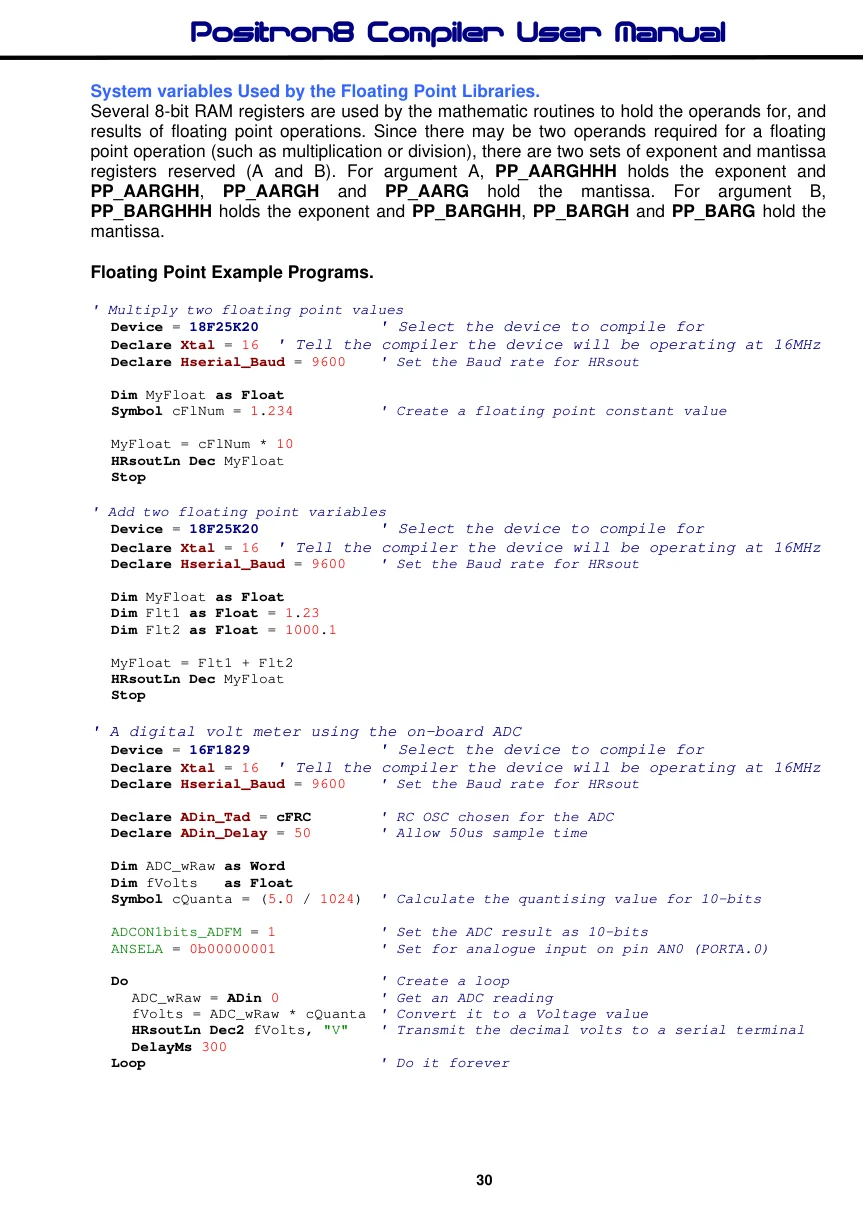
Notes.
Any expression that contains a floating point variable or constant will be calculated as a floating point, even if the expression also contains integer constants or variables.
If the assignment variable is an integer variable, but the expression is of a floating point nature, then the floating point result will be converted into an integer.
Device = 16F1829               ' Select the device to compile for
Declare Xtal = 16  ' Tell the compiler the device will be operating at 16MHz
Declare Hserial_Baud = 9600   ' Set the Baud rate for HRsout

Dim MyDword as Dword
Dim MyFloat as Float = 10
Symbol cPI = 3.14

MyDword = MyFloat + cPI ' Float calculation will be 13.14, reduced to 13
HRsoutLn Dec MyDword   ' Transmit the integer result 13
Stop
For a more in-depth explanation of floating point, download the Microchip application notes AN575, and AN660. These can be found at www.microchip.com.