File_Size()
… visits


File_Size(pFileName As Global_sFileName), Dword
|
Parameter |
Description |
|
pFileName |
The name of the file whose size you want to check. It should be a string with a maximum length of 12 characters, including the file extension (e.g., "MyFile.txt"). |
Result Dword: The size of the specified file in bytes.
File_Size() is used to get the size of a file, specified by its name, in bytes. This function returns the file size based on the file stored on the SD card.
File_Size("MyFile.txt")
Limitation:
|
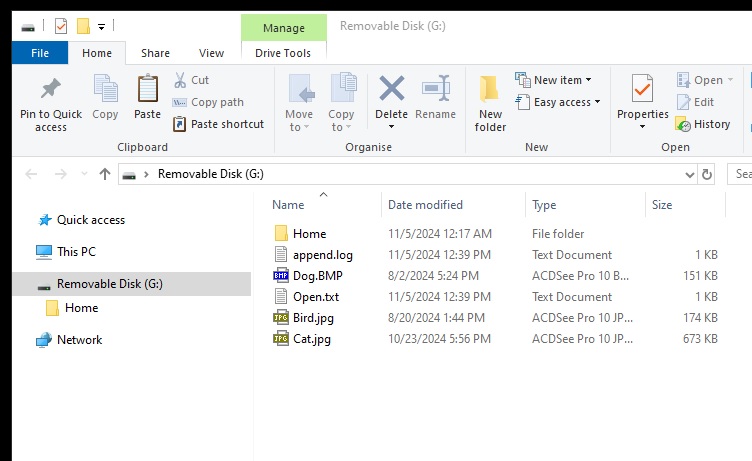
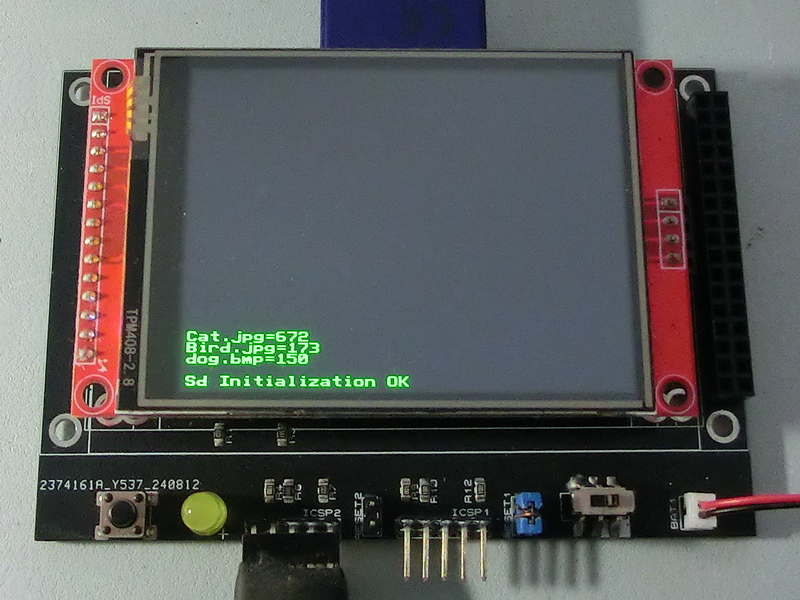
TftSetUp(0, 0) 'Set screen TftResetScreen(BLACK) 'Reset screen TftSetSndFont(0,0) 'Set Font0 While File_Init() <> cErrOK : Wend 'Initialize SD Card TftPrintSndString("Sd Initialization OK",1,0,0,1,GREEN,BLACK,0) 'Confirm Initialize SD Card dTemp = File_Size("dog.bmp") 'Get dog.bmp size dTemp = dTemp / 1024 'Convert to KB TftPrintSndString("dog.bmp=" + Str$(Dec dTemp),1,0,2,1,GREEN,BLACK,0) 'Display file size dTemp = File_Size("Bird.jpg") 'Get Bird.jpg size dTemp = dTemp / 1024 'Convert to KB TftPrintSndString("Bird.jpg=" + Str$(Dec dTemp),1,0,3,1,GREEN,BLACK,0) 'Display file size dTemp = File_Size("Cat.jpg") 'Get Cat.jpg size dTemp = dTemp / 1024 'Convert to KB TftPrintSndString("Cat.jpg=" + Str$(Dec dTemp),1,0,4,1,GREEN,BLACK,0) 'Display file size |
|
|
Created with the Personal Edition of HelpNDoc: Make Your PDFs More Secure with Encryption and Password Protection