Using a KS0108 Graphic LCD
Once a KS0108 graphic LCD has been chosen using the Declare LCD_Type directive, all Print outputs will be directed to that LCD.
The standard modifiers used by an alphanumeric LCD may also be used with the graphics LCD. Most of the above modifiers still work in the expected manner, however, the At modifier now starts at Ypos 0 and Xpos 0, where values 0,0 will be the top left corner of the LCD.
There are also four new modifiers. These are: -
| Inverse 0-1 | Invert the characters sent to the LCD |
| Or 0-1 | Or the new character with the original |
| Xor 0-1 | Xor the new character with the original |
Once one of the four new modifiers has been enabled, all future Print commands will use that particular feature until the modifier is disabled. For example: -
' Enable inverted characters from this point
  Print At 0, 0, Inverse 1, "Hello World"
  Print At 1, 0, "Still Inverted"
' Now use normal characters
  Print At 2, 0, Inverse 0, "Normal Characters"
If no modifiers are present, then the character's ASCII representation will be displayed: -
' Print characters A and B
  Print At 0, 0, 65, 66
KS0108 graphic LCD Declares
There are several declares associated with a KS0108 graphic LCD.
Declare LCD_DTPort Port = Port.Byten Assign the port that will output the 8-bit data to the graphic LCD.
There is no default setting for this Declare and it must be used within the BASIC program.
Declare LCD_RWPin = Port.Pin Assigns the Port and Pin that the graphic LCD's RW line will attach to.
There is no default setting for this Declare and it must be used within the BASIC program.
Declare LCD_ENPin Port.Pin Assigns the Port and Pin that the LCD's EN line will attach to.
There is no default setting for this Declare and it must be used within the BASIC program.
Declare LCD_RSPin Port.Pin Assigns the Port and Pins that the LCD's RS line will attach to.
There is no default setting for this Declare and it must be used within the BASIC program.
Declare LCD_CS1Pin = Port.Pin Assigns the Port and Pin that the graphic LCD's CS1 line will attach to.
There is no default setting for this Declare and it must be used within the BASIC program.
Declare LCD_CS2Pin = Port.Pin Assigns the Port and Pin that the graphic LCD's CS2 line will attach to.
There is no default setting for this Declare and it must be used within the BASIC program.
Note
The KS0108 graphic LCD is a “non-intelligent” type, therefore, a separate character set is required. This is held internally in code memory.
The code memory table that contains the font must have a label named Font_Table. For example: -
'{ data for characters 0 to 64 here}
  Dim Font_Table as Code = $7E, $11, $11, $11, $7E, $00,_   ' Chr 65 "A"
                           $7F, $49, $49, $49, $36, $00,_   ' Chr 66 "B"
   { rest of font table }
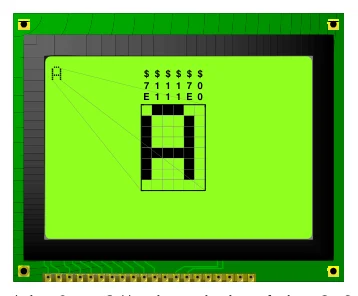
The font is built up of an 8x6 cell, with only 5 of the 6 rows, and 7 of the 8 columns being used for alphanumeric characters. See the diagram below.
Text in this figure or table
$ $ $ $ $ $ 7 1 1 1 7 0 E 1 1 1 E 0
If a graphic character is chosen (chr 0 to 31), the whole of the 8x6 cell is used. In this way, large fonts and graphics may be easily constructed.
The character set itself is 128 characters long (0 -127). Which means that all the ASCII characters are present, including $, %, &, # etc.
Declare GLCD_CS_Invert On - Off, 1 or 0 Some graphic LCD types have inverters on the CS lines. Which means that the LCD displays left-hand data on the right side, and vice-versa. The GLCD_CS_Invert Declare, adjusts the library LCD handling subroutines to take this into account.
Declare GLCD_Strobe_Delay 0 to 16383 cycles. If a noisy circuit layout is unavoidable when using a graphic LCD, then the above Declare may be used. This will create a delay between the Enable line being strobed. This can ease random data being produced on the LCD's screen. See below for more details on circuit layout for graphic LCDs.
If the Declare is not used in the program, then the cycles delay is determined by the oscillator used.
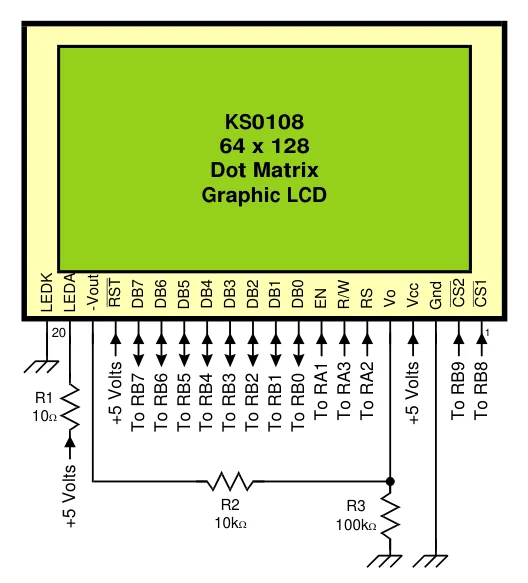
Text in this figure or table
KS0108 64 x 128 Dot Matrix Graphic LCD
-Vout RST DB7 DB6 DB5 DB4 DB3 DB2 DB1 DB0 EN R/W RS Vo Vcc Gnd CS2 CS1 LEDK LEDA
1 20
R1
| 10Ω | To RA1To RA3To RA2 | To RB9To RB8 |
| +5 Volts | +5 Volts |
To RB7To RB6To RB5To RB4To RB3To RB2To RB1To RB0
| R2 | R3 | |
| +5 Volts | 10kΩ | 100kΩ |
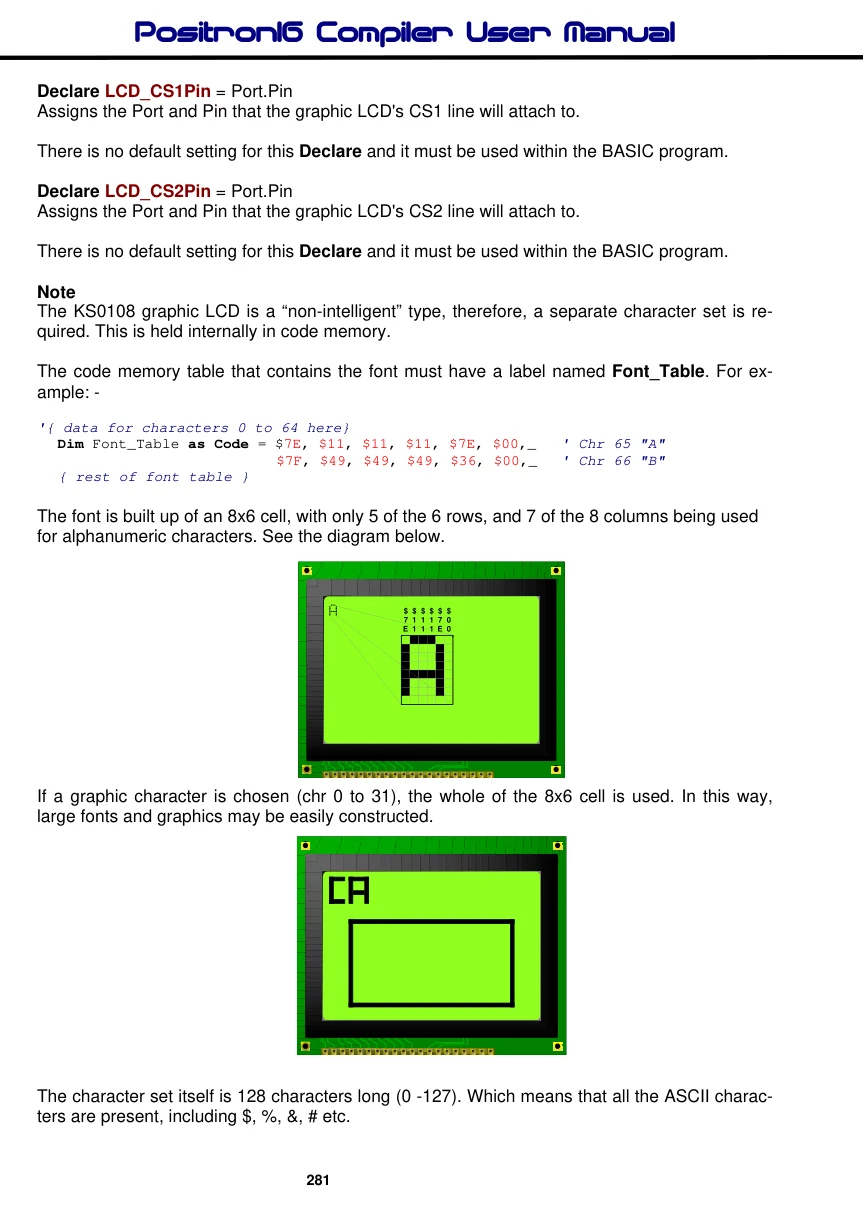
The diagram above shows typical connections to a KS0108 graphic LCD.