Freqout
Syntax
Freqout Pin, Period, Freq1 {, Freq2}
Overview
Generate one or two sine-wave tones, of differing or the same frequencies, for a specified period.
Parameters
Pin is a Port-Bit combination that specifies which I/O pin to use. Period may be a variable, constant, or expression (0 - 65535) specifying the amount of time to generate the tone(s). Freq1 may be a variable, constant, or expression (0 - 32767) specifying frequency of the first tone. Freq2 may be a variable, constant, or expression (0 - 32767) specifying frequency of the second tone. When specified, two frequencies will be mixed together on the same I/O pin.
Example
' Generate a 2500Hz (2.5KHz) tone for 1 second (1000 ms) on bit 0 of PORTA.
  Freqout PORTA.0, 1000, 2500

' Play two tones at once for 1000ms. One at 2.5KHz, the other at 3KHz.
  Freqout PORTA.0, 1000, 2500, 30000
Notes.
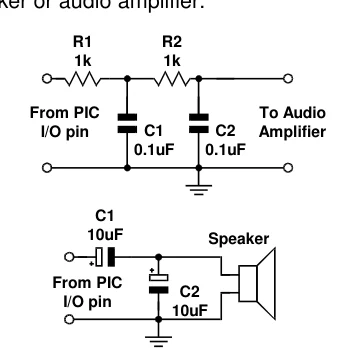
Freqout generates one or two sine waves using a pulse-width modulation algorithm. Freqout will work with a 4MHz crystal, however, it is best used with higher frequency crystals, and operates accurately with a 20MHz or 40MHz crystal. The raw output from Freqout requires filtering, to eliminate most of the switching noise. The circuits shown below will filter the signal in order
Text in this figure or table
| R1 | R2 |
| 1k | 1k |
| From PIC | To Audio |
| C1 | C2 |
| I/O pin | Amplifier |
| 0.1uF | 0.1uF |
C1
10uF Speaker
From PIC C2 I/O pin 10uF
to play the tones through a speaker or audio amplifier.
The two circuits shown above, work by filtering out the high-frequency PWM used to generate the sine waves. Freqout works over a very wide range of frequencies (0 to 32767KHz) so at the upper end of its range, the PWM filters will also filter out most of the desired frequency. You may need to reduce the values of the parallel capacitors shown in the circuit, or to create an active filter for your application.

Example 2
' Play a tune using Freqout to generate the notes

  Device = 24FJ64GA002        ' Select the device to compile for
  Declare Xtal = 16

  Dim bLoop as Byte            ' Counter for notes.
  Dim Freq1 as Word            ' Frequency1.
  Dim Freq2 as Word            ' Frequency2
  Symbol C = 2092              ' C note
  Symbol D = 2348              ' D note
  Symbol E = 2636              ' E note
  Symbol G = 3136              ' G note
  Symbol R = 0                ' Silent pause.
  Symbol FreqPin = PORTA.0     ' Sound output pin

  bLoop = 0
  Repeat                   ' Create a loop for 29 notes within the LookUpL table.
     Freq1 = LookUpL bLoop,[E,D,C,D,E,E,E,R,D,D,D,_
                             R,E,G,G,R,E,D,C,D,E,E,E,E,D,D,E,D,C]
     If Freq1 = 0 Then
       Freq2 = 0
    Else
       Freq2 = Freq1 - 8
     EndIf
     Freqout FreqPin, 225, Freq1, Freq2
     Inc bLoop
  Until bLoop > 28