Inkey
Syntax
Assignment Variable = Inkey
Overview
Scan a matrix keypad and place the returned value of the button pressed.
Parameters
None Assignment Variable is a user defined variable.
Example
  Device = 24FJ64GA002             ' Select the device to compile for
  Declare Xtal = 16
  Declare Hserial_Baud = 9600       ' USART1 Baud rate
  Declare Hrsout1_Pin = PORTB.14    ' Select the pin for TX with USART1
  Declare KeyPad_Port = PORTB

  Dim MyByte as Byte
  RPOR7 = 3                      ' Make PPS Pin RP14 U1TX

  Do                              ' Create an infinite loop
     MyByte = Inkey               ' Scan the keypad
     DelayMs 50                  ' Simple debounce by waiting 50ms
     Hrsout Dec MyByte, 13        ' Display the result
  Loop                           ' Do it forever
Notes.
Inkey will return a value between 0 and 16. If no key is pressed, the value returned is 16.
Using a LookUp command, the returned values can be re-arranged to correspond with the legends printed on the keypad: -
MyByte = Inkey
MyKey = LookUp MyByte, [255,1,4,7,"*",2,5,8,0,3,6,9,"#",0,0,0]
The above example is only a demonstration, the values inside the LookUp command will need to be re-arranged for the type of keypad used, and its connection configuration.
Inkey Declare
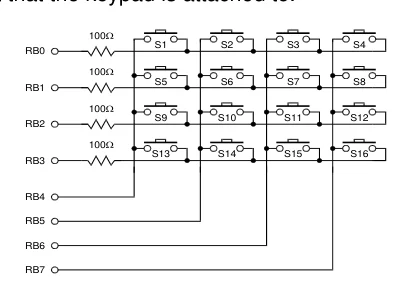
Declare Keypad_Port Port
Text in this figure or table
100Ω
S1 S2 S3 S4
RB0 100Ω
S5 S6 S7 S8
RB1 100Ω
S9 S10 S11 S12
RB2 100Ω
S13 S14 S15 S16
RB3
RB4
RB5
RB6
RB7
Assigns the 8-bits of a Port that the keypad is attached to.
The diagram above illustrates typical connections for a 16-button keypad.