RCin
Syntax
Assignment Variable = RCin Pin, State
Overview
Count time while pin remains in state, usually used to measure the charge/ discharge time of resistor/capacitor (RC) circuit.
Parameters
Pin is a Port.Pin constant that specifies the I/O pin to use. This pin will be placed into input mode and left in that state when the instruction finishes. State is a variable or constant (1 or 0) that will end the Rcin period. Text, High or Low may also be used instead of 1 or 0. Assignment Variable is a variable in which the time measurement will be stored.
Example
Device = 24HJ128GP502               ' Select the device to compile for
Declare Xtal = 16

Dim MyResult as Word                ' Word variable to hold result.

PinHigh PORTB.0                     ' Discharge the capacitor
DelayMs 1                          ' Wait for 1 ms.
MyResult = RCin PORTB.0, High       ' Measure RC charge time.
Print Dec MyResult, " "             ' Display the value on an LCD.
Notes.
The resolution of RCin is dependent upon the oscillator frequency. The resolution always changes with the actual oscillator speed. If the pin never changes state 0 is returned.
When RCin executes, it starts a counter. The counter stops as soon as the specified pin is no longer in State (0 or 1). If pin is not in State when the instruction executes, RCin will return 1 in Variable, since the instruction requires one timing cycle to discover this fact. If pin remains in State longer than 65535 timing cycles RCin returns 0.
Text in this figure or table
R To
I/O Pin
Ω
Text in this figure or table
220 C Ω
To
| +3.3 Volts | +3.3 Volts |
| 220 | I/O Pin |
| C | R |
| Figure A | Figure B |
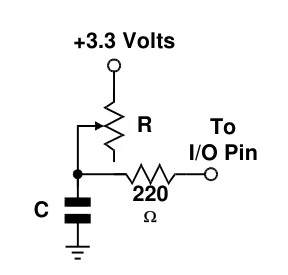
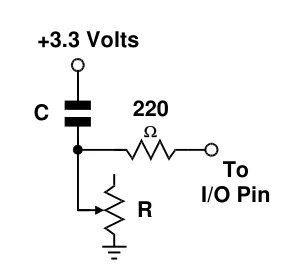
The diagrams above show two suitable RC circuits for use with RCin. The circuit in figure B is preferred, because of the microcontroller’s logic threshold.
Before RCin executes, the capacitor must be put into the state specified in the RCin command. For example, with figure B, the capacitor must be discharged until both plates (sides of the capacitor) are at 3.3V. It may seem strange that discharging the capacitor makes the input high, but you must remember that a capacitor is charged when there is a voltage difference between its plates. When both sides are at +3.3 Volts, the capacitor is considered discharged. Below is a typical sequence of instructions for the circuit in figure A.
Dim MyResult as Word              ' Word variable to hold result.

PinHigh PORTB.0                   ' Discharge the capacitor
DelayMs 1                        ' Wait for 1ms.
MyResult = RCin PORTB.0, High    ' Measure RC charge time.
Print Dec MyResult, "  "         ' Display the value on an LCD.