Select..Case..EndSelect
Syntax
Select Expression
Case Condition(s) Instructions { Case Condition(s) Instructions
Case Else Statement(s) } EndSelect
The curly braces signify optional conditions.
Overview
Evaluate an Expression then continually execute a block of BASIC code based upon comparisons to Condition(s). After executing a block of code, the program continues at the line following the EndSelect. If no conditions are found to be True and a Case Else block is included, the code after the Case Else leading to the EndSelect will be executed.
Parameters
Expression can be any valid variable, constant, expression or inline command that will be compared to the Conditions. Condition(s) is a statement that can evaluate as True or False. The Condition can be a simple or complex relationship, as described below. Multiple conditions within the same Case can be separated by commas. Instructions can be any valid BASIC command that will be operated on if the Case condition produces a True result.
Example
' Load variable MyResult according to the contents of variable Var1
' MyResult will return a value of 255 if no valid condition was met
  Device = 18F26K40          ' Compiler for an 18F device
  Declare Xtal = 20          ' Tell the compiler the device is operating at 20MHz
  Declare Hserial_Baud = 9600  ' Choose the Baud rate for HRsoutLn

  Dim Var1 as Byte
  Dim MyResult as Byte

  MyResult = 0          ' Clear the MyResult variable before we start
  Var1 = 1               ' Variable to base the conditions upon
  Select Var1
     Case 1               ' Is Var1 equal to 1 ?
       MyResult = 1      ' Load MyResult with 1 if yes
     Case 2               ' Is Var1 equal to 2 ?
       MyResult = 2      ' Load MyResult with 2 if yes
     Case 3               ' Is Var1 equal to 3 ?
       MyResult = 3      ' Load MyResult with 3 if yes
     Case Else             ' Otherwise...
       MyResult = 255      ' Load MyResult with 255
  EndSelect
  HRsoutLn Dec MyResult   ' Display the value of MyResult
Notes
Select..Case is simply an advanced form of the If..Then..ElseIf..Else construct, in which multiple ElseIf statements are executed by the use of the Case command.
Taking a closer look at the Case command: -
Case Conditional_Op Expression
Where Conditional_Op can be an = operator (which is implied if absent), or one of the standard comparison operators <>, <, >, >= or <=. Multiple conditions within the same Case can be separated by commas. If, for example, you wanted to run a Case block based on a value being less than one or greater than nine, the syntax would look like: -
Case < 1, > 9Another way to implement Case is: -
Case value1 to value2In this form, the valid range is from Value1 to Value2, inclusive. So if you wished to run a Case block on a value being between the values 1 and 9 inclusive, the syntax would look like: -
Case 1 To 9For those of you that are familiar with C or Java, you will know that in those languages the statements in a Case block fall through to the next Case block unless the keyword break is encountered. In BASIC however, the code under an executed Case block jumps to the code immediately after EndSelect.
The word Default can be used instead of the name Else, within a Select...EndSelect block, if required.
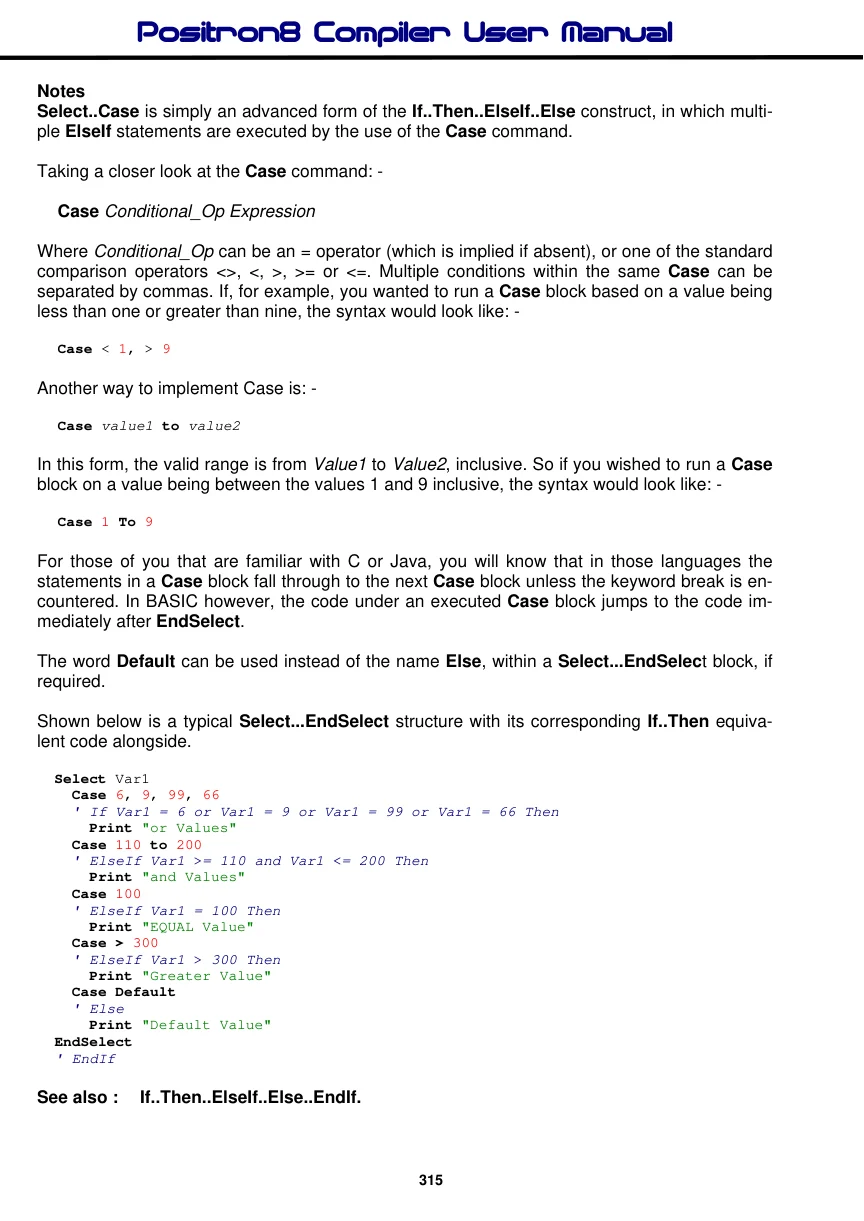
Shown below is a typical Select...EndSelect structure with its corresponding If..Then equivalent code alongside.
  Select Var1
    Case 6, 9, 99, 66
    ' If Var1 = 6 or Var1 = 9 or Var1 = 99 or Var1 = 66 Then
      Print "or Values"
    Case 110 to 200
    ' ElseIf Var1 >= 110 and Var1 <= 200 Then
      Print "and Values"
    Case 100
    ' ElseIf Var1 = 100 Then
      Print "EQUAL Value"
    Case > 300
    ' ElseIf Var1 > 300 Then
      Print "Greater Value"
    Case Default
    ' Else
      Print "Default Value"
  EndSelect
  ' EndIf
See also : If..Then..ElseIf..Else..EndIf.