LCDwrite
Syntax
LCDwrite Ypos, Xpos, [ Value ,{ Value etc…} ]
Overview
Write a byte to a graphic LCD.
Parameters
Ypos :- With a KS0108 graphic LCD this may be a constant, variable or expression within the range of 0 to 7 This corresponds to the line number of the LCD, with 0 being the top row.
With a Toshiba T6963 graphic LCD this may be a constant, variable or expression within the range of 0 to the Y resolution of the display. With 0 being the top line. Xpos: - With a KS0108 graphic LCD this may be a constant, variable or expression with a value of 0 to 127. This corresponds to the X position of the LCD, with 0 being the far left column. With a Toshiba graphic LCD this may be a constant, variable or expression with a value of 0 to the X resolution of the display divided by the font width (LCD_X_Res / LCD_Font_Width). This corresponds to the X position of the LCD, with 0 being the far left column. Value may be a constant, variable, or expression, within the range of 0 to 255 (byte).
Example 1
' Display a line on the top row of a KS0108 graphic LCD
  Device = 16F1829
  Declare LCD_Type = KS0108          ' Target a KS0108 graphic LCD
  Dim Xpos as Byte

  Cls                                ' Clear the LCD
  For Xpos = 0 to 127               ' Create a loop of 128
     LCDwrite 0, Xpos, [0b11111111]   ' Write to the LCD's top line
     DelayMs 100
  Next
  Stop
Example 2
' Display a line on the top row of a Toshiba 128x64 graphic LCD
  Device = 16F1829
  Declare LCD_Type = Toshiba         ' Target a Toshiba graphic LCD
  Dim Xpos as Byte

  Cls                                ' Clear the LCD
  For Xpos = 0 to 20                  ' Create a loop of 21
     LCDwrite 0, Xpos, [0b00111111]   ' Write to the LCD's top line
     DelayMs 100
  Next
  Stop
Notes
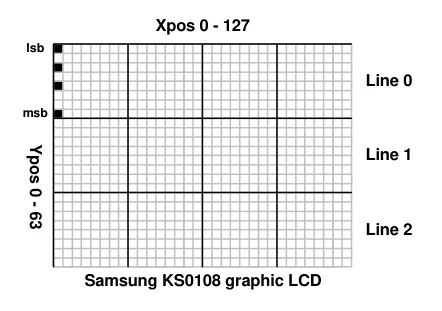
The graphic LCDs that are compatible with compiler’s built-in library routines are the KS0108, and the Toshiba T6963. The KS0108 display has a pixel resolution of 64 x 128. The 64 being the Y axis, made up of 8 lines each having 8-bits. The 128 being the X axis, made up of 128 positions. The Toshiba LCDs are available with differing resolutions.

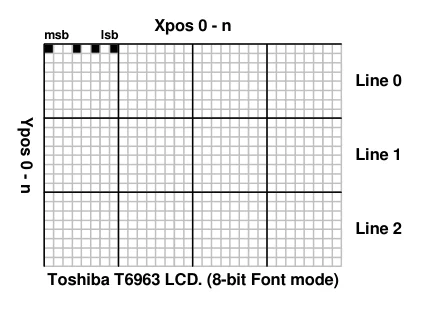
There are important differences between the KS0108 and Toshiba screen formats. The diagrams below show these in more detail: -
The diagram below illustrates the position of one byte at position 0,0 on a KS0108 LCD screen. The least significant bit is located at the top. The byte displayed has a value of 149 (10010101).
Text in this figure or table
Xpos 0 - 127 lsb
Line 0
msb
Ypos 0 - 63 Line 1
Line 2
Samsung KS0108 graphic LCD
The diagram below illustrates the position of one byte at position 0,0 on a Toshiba T6963 LCD screen in 8-bit font mode. The least significant bit is located at the right of the screen byte. The byte displayed has a value of 149 (10010101).
Text in this figure or table
Xpos 0 - n
msb lsb
Line 0
Ypos 0 - n Line 1
Line 2
Toshiba T6963 LCD. (8-bit Font mode)
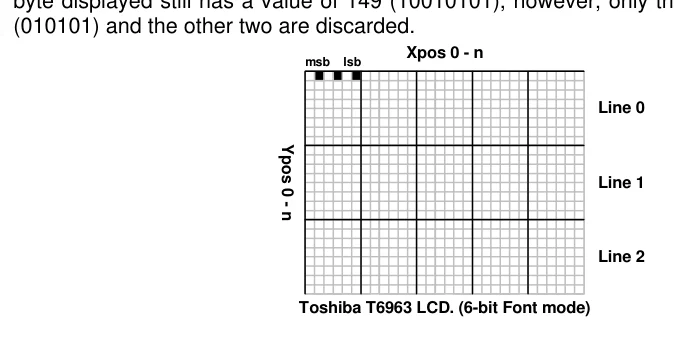
The diagram below illustrates the position of one byte at position 0,0 on a Toshiba T6963 LCD screen in 6-bit font mode. The least significant bit is located at the right of the screen byte. The
Text in this figure or table
(010101) and the other two are discarded. Xpos 0 - n msb lsb
Line 0
Ypos 0 - n Line 1
Line 2
Toshiba T6963 LCD. (6-bit Font mode)
byte displayed still has a value of 149 (10010101), however, only the first 6 bits are displayed
See also : LCDread, Plot, Toshiba_Command, Toshiba_UDG, UnPlot, see Print for LCD connections.
