Using a Toshiba T6963 Graphic LCD
Once a Toshiba graphic LCD has been chosen using the Declare LCD_Type directive, all Print outputs will be directed to that LCD.
The standard modifiers used by an alphanumeric LCD may also be used with the graphics LCD. Most of the modifiers still work in the expected manner, however, the At modifier now starts at Ypos 0 and Xpos 0, where values 0,0 correspond to the top left corner of the LCD.
The KS0108 modifiers Font, Inverse, Or, and Xor are not supported because of the method Toshiba LCD’s using the T6963 chipset implement text and graphics.
There are several Declares for use with a Toshiba graphic LCD, some optional and some mandatory.
Declare LCD_DTPort Port.Pin Assign the port that will output the 8-bit data to the graphic LCD.
There is no default setting for this Declare and it must be used within the BASIC program.
Declare LCD_WRPin Port.Pin Assigns the Port and Pin that the graphic LCD's WR line will attach to.
There is no default setting for this Declare and it must be used within the BASIC program.
Declare LCD_RDPin Port.Pin Assigns the Port and Pin that the graphic LCD's RD line will attach to.
There is no default setting for this Declare and it must be used within the BASIC program.
Declare LCD_CEPin Port.Pin Assigns the Port and Pin that the graphic LCD's CE line will attach to.
There is no default setting for this Declare and it must be used within the BASIC program.
Declare LCD_CDPin Port.Pin Assigns the Port and Pin that the graphic LCD's CD line will attach to.
There is no default setting for this Declare and it must be used within the BASIC program.
Declare LCD_RSTPin Port.Pin Assigns the Port and Pin that the graphic LCD's RST line will attach to.
The LCD’s RST (Reset) Declare is optional and if omitted from the BASIC code the compiler will not manipulate it. However, if not used as part of the interface, you must set the LCD’s RST pin high for normal operation.
Declare LCD_X_Res 0 to 255 LCD displays using the T6963 chipset come in varied screen sizes (resolutions). The compiler must know how many horizontal pixels the display consists of before it can build its library subroutines.
There is no default setting for this Declare and it must be used within the BASIC program.
Declare LCD_Y_Res 0 to 255 LCD displays using the T6963 chipset come in varied screen sizes (resolutions). The compiler must know how many vertical pixels the display consists of before it can build its library subroutines.
There is no default setting for this Declare and it must be used within the BASIC program.
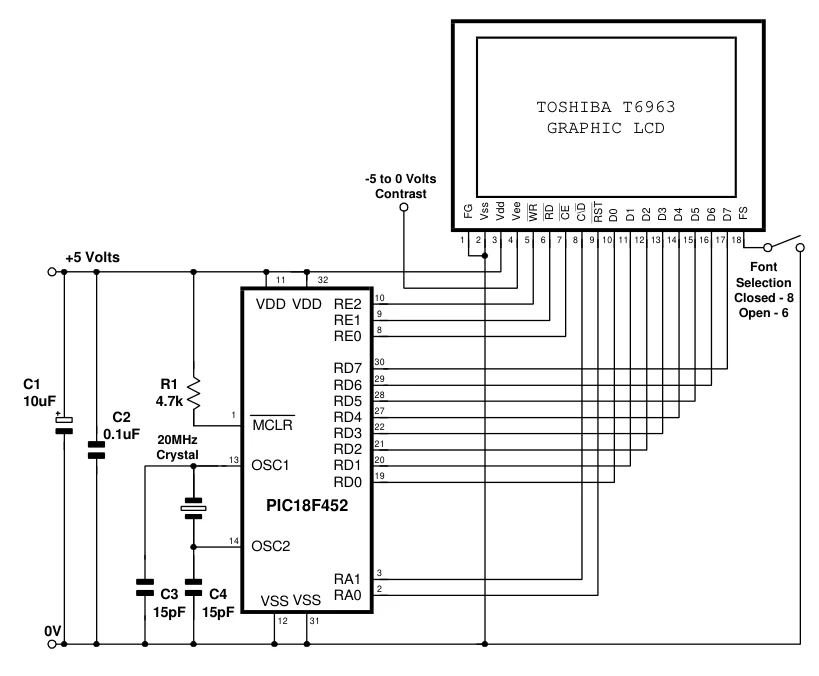
Declare LCD_Font_Width 6 or 8 The Toshiba T6963 graphic LCDs have two internal font sizes, 6 pixels wide by eight high, or 8 pixels wide by 8 high. The particular font size is chosen by the LCD’s FS pin. Leaving the FS pin floating or bringing it high will choose the 6 pixel font, while pulling the FS pin low will choose the 8 pixel font. The compiler must know what size font is required so that it can calculate screen and RAM boundaries.
Note that the compiler does not control the FS pin and it is down to the circuit layout whether or not it is pulled high or low. There is no default setting for this Declare and it must be used within the BASIC program.
Declare LCD_RAM_Size 1024 to 65535 Toshiba graphic LCDs contain internal RAM used for Text, Graphic or Character Generation. The amount of RAM is usually dictated by the display’s resolution. The larger the display, the more RAM is normally present. Standard displays with a resolution of 128x64 typically contain 4096 bytes of RAM, while larger types such as 240x64 or 190x128 typically contain 8192 bytes or RAM. The display’s datasheet will inform you of the amount of RAM present.
If this Declare is not issued within the BASIC program, the default setting is 8192 bytes.
Declare LCD_Text_Pages 1 to n As mentioned above, Toshiba graphic LCDs contain RAM that is set aside for text, graphics or characters generation. In normal use, only one page of text is all that is required, however, the compiler can re-arrange its library subroutines to allow several pages of text that is continuous. The amount of pages obtainable is directly proportional to the RAM available within the LCD itself. Larger displays require more RAM per page, therefore always limit the amount of pages to only the amount actually required or unexpected results may be observed as text, graphic and character generator RAM areas merge.
This Declare is purely optional and is usually not required. The default is 3 text pages if this Declare is not issued within the BASIC program.
Declare LCD_Graphic_Pages 1 to n Just as with text, the Toshiba graphic LCDs contain RAM that is set aside for graphics. In normal use, only one page of graphics is all that is required, however, the compiler can re-arrange its library subroutines to allow several pages of graphics that is continuous. The amount of pages obtainable is directly proportional to the RAM available within the LCD itself. Larger displays require more RAM per page, therefore always limit the amount of pages to only the amount actually required or unexpected results may be observed as text, graphic and character generator RAM areas merge.
This Declare is purely optional and is usually not required. The default is 1 graphics page if this Declare is not issued within the BASIC program.
Declare LCD_Text_Home_Address 0 to n The RAM within a Toshiba graphic LCD is split into three distinct uses, text, graphics and character generation. Each area of RAM must not overlap or corruption will appear on the display as one uses the other’s assigned space. The compiler’s library subroutines calculate each area of RAM based upon where the text RAM starts. Normally the text RAM starts at address 0, however, there may be occasions when it needs to be set a little higher in RAM. The order of RAM is; Text, Graphic, then Character Generation.
This Declare is purely optional and is usually not required. The default is the text RAM staring at address 0 if this Declare is not issued within the BASIC program.
Notes
Unlike interfacing to the KS0108 graphic LCD, only four of the eight stack levels available on the 14-bit core devices, are used when the Print command is issued.
If any of the LCD’s pins are attached to any of the PICmicro’s analogue pins. i.e. PORTA or PORTE, then these pins must be set to digital by manipulating the appropriate SFRs (Special Function Registers).
The diagram below shows a typical circuit for an interface with a Toshiba T6963 graphic LCD.
Text in this figure or table
TOSHIBA T6963
 GRAPHIC LCD
-5 to 0 Volts Contrast FG Vss Vdd Vee WR RD CE C\D RST D0 D1 D2 D3 D4 D5 D6 D7 FS
1 2 3 4 5 6 7 8 9 10 11 12 13 14 15 16 17 18
+5 Volts Font
| 11 | 32 | Selection |
| 10 | Closed - 8 |
VDD VDD RE2 Open - 6 9 RE1 8 RE0
30 RD7 29
C1 R1 RD6
28
10uF 4.7k RD5
27 1
| C2 | RD4 |
| MCLR | 22 |
| 0.1uF | RD3 |
| 20MHz | 21 |
RD2
| Crystal | 13 | 20 |
| OSC1 | RD1 |
19 RD0 PIC18F452
14 OSC2
3 RA1 2
C3 C4 RA0
VSSVSS 15pF 15pF
12 31
0V