Inkey
Syntax
Variable = Inkey
Overview
Scan a keypad and place the returned value into variable
Parameters
Variable is a user defined variable
Example
Dim bVar1 as Byte

bVar1 = Inkey          ' Scan the keypad
DelayMs 50             ' Debounce by waiting 50ms
Print Dec bVar1, " "   ' Display the result on the LCD
Notes
Inkey will return a value between 0 and 16. If no key is pressed, the value returned is 16.
Using a LookUp command, the returned values can be re-arranged to correspond with the legends printed on the keypad: -
bVar1 = Inkey
bKey = LookUp bVar1, [255,1,4,7,"*",2,5,8,0,3,6,9,"#",0,0,0]
The above example is only a demonstration, the values inside the LookUp command will need to be re-arranged for the type of keypad used, and its connection configuration.
Declare for Inkey
Declare Keypad_Port Port Assigns the Port that the keypad is attached to.
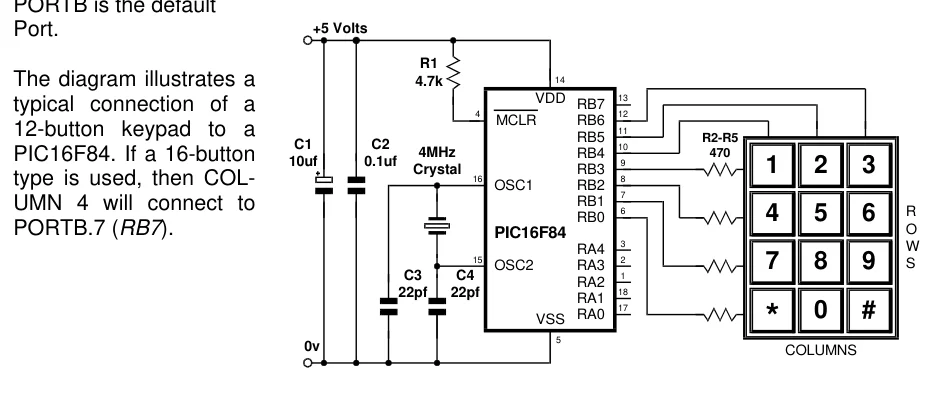
The keypad routine requires pull-up resistors, therefore, the best Port for this device is PORTB, which comes equipped with internal pull-ups. If the Declare is not used in the program, then
Text in this figure or table
+5 Volts Port.
R1
| The diagram illustrates a | 4.7k | 14 |
| VDD | 13 | |
| typical connection of a | RB7 | |
| 4 | 12 | |
| MCLR | RB6 | |
| 12-button keypad to a | 11 | |
| RB5 | R2-R5 | |
| C1 | C2 | 10 |
| 4MHz | RB4 | 470 |
PIC16F84. If a 16-button
| 10uf | 0.1uf | 9 |
| 1 | 2 | 3 |
| Crystal | RB3 | |
| 16 | 8 |
type is used, then COL-
OSC1 RB2
7 RB1
UMN 4 will connect to 6
R
RB0 4 5 6
O
| PORTB.7 (RB7). | PIC16F84 |
| 3 | W |
RA4
| 15 | 2 | ||
| 7 | 8 | 9 | S |
| OSC2 | RA3 | ||
| C3 | C4 | 1 |
RA2 18
22pf 22pf
RA1 17
RA0 0 #
VSS * 5
0v COLUMNS
PORTB is the default