Owrite
Syntax
Owrite DQ_Pin, Mode, [ OutputData ]
Overview
Send data to a device using the Dallas Semiconductor 1-wire protocol. The 1-wire protocol is a form of asynchronous serial communication developed by Dallas Semiconductor. It requires only one I/O pin which may be shared between multiple 1-wire d vices.
Parameters
DQ_Pin is a Port-Bit combination that specifies which I/O pin to use. 1-wire devices require only one I/O pin (normally called DQ) to communicate. This I/O pin will be toggled between output and input mode during the Owrite command and will be set to input mode by the end of the Owrite command. Mode is a numeric constant (0 - 7) indicating the mode of data transfer. The Mode parameter controls the placement of reset pulses and detection of presence pulses, as well as byte or bit input. See notes below. OutputData is a list of variables or arrays transmit individual or repeating bytes.
Example
Symbol DQ_Pin = PORTA.0
Owrite DQ_Pin, 1, [$4E]
The above example will transmit a 'reset' pulse to a 1-wire device (connected to bit-0 of PORTA) and will then detect the device's 'presence' pulse and transmit one byte (the value $4E).
Notes
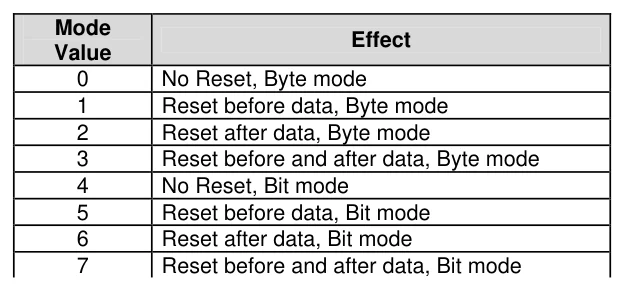
The Mode parameter is used to control placement of reset pulses (and detection of presence pulses) and to designate byte or bit input. The table below shows the meaning of each of the 8 possible value combinations for Mode.
Text in this figure or table
Mode Effect Value
| 0 | No Reset, Byte mode |
| 1 | Reset before data, Byte mode |
| 2 | Reset after data, Byte mode |
| 3 | Reset before and after data, Byte mode |
| 4 | No Reset, Bit mode |
| 5 | Reset before data, Bit mode |
| 6 | Reset after data, Bit mode |
| 7 | Reset before and after data, Bit mode |
The correct value for Mode depends on the 1-wire device and the portion of the communication you're dealing with. Consult the data sheet for the device in question to determine the correct value for Mode. In many cases, however, when using the Owrite command, Mode should be set for a Reset before data (to initialise the transaction). However, this may vary due to device and application requirements.
When using the Bit (rather than Byte) mode of data transfer, all variables in the InputData variable will only receive one bit. For example, the following code could be used to receive two bits using this mode: -
Dim tBitVar1 as Bit
Dim tBitVar2 as Bit
Owrite PORTA.0, 6, [tBitVar1, tBitVar2]
In the example code shown, a value of 6 was chosen for Mode. This sets Bit transfer and Reset after data mode. We could also have chosen to make the tBitVar1 and tBitVar2 variables each a Byte type, however, they would still only use their lowest bit (Bit-0) as the value to transmit in the Owrite command, due to the Mode value chosen.
The Str Modifier
The Str modifier is used for transmitting a string of bytes from a byte array variable. A string is a set of bytes sized values that are arranged or accessed in a certain order. The values 1, 2, 3 would be stored in a string with the value 1 first, followed by 2 then followed by the value 3. A byte array is a similar concept to a string; it contains data that is arranged in a certain order. Each of the elements in an array is the same size. The string 1,2,3 would be stored in a byte array containing three bytes (elements).
Below is an example that sends four bytes (from a byte array) through bit-0 of PORTA: -
Dim bMyArray[10] as Byte = $CC, $44, $CC, $4E  ' Create a 10 element array.
Owrite PORTA.0, 1, [Str bMyArray\4]   ' Send 4-byte string.
Note that we use the optional \n argument of Str. If we didn't specify this, the PICmicro™ would try to keep sending characters until all 10 bytes of the array were transmitted. Since we do not wish all 10 bytes to be transmitted, we chose to tell it explicitly to only send the first 4 bytes.