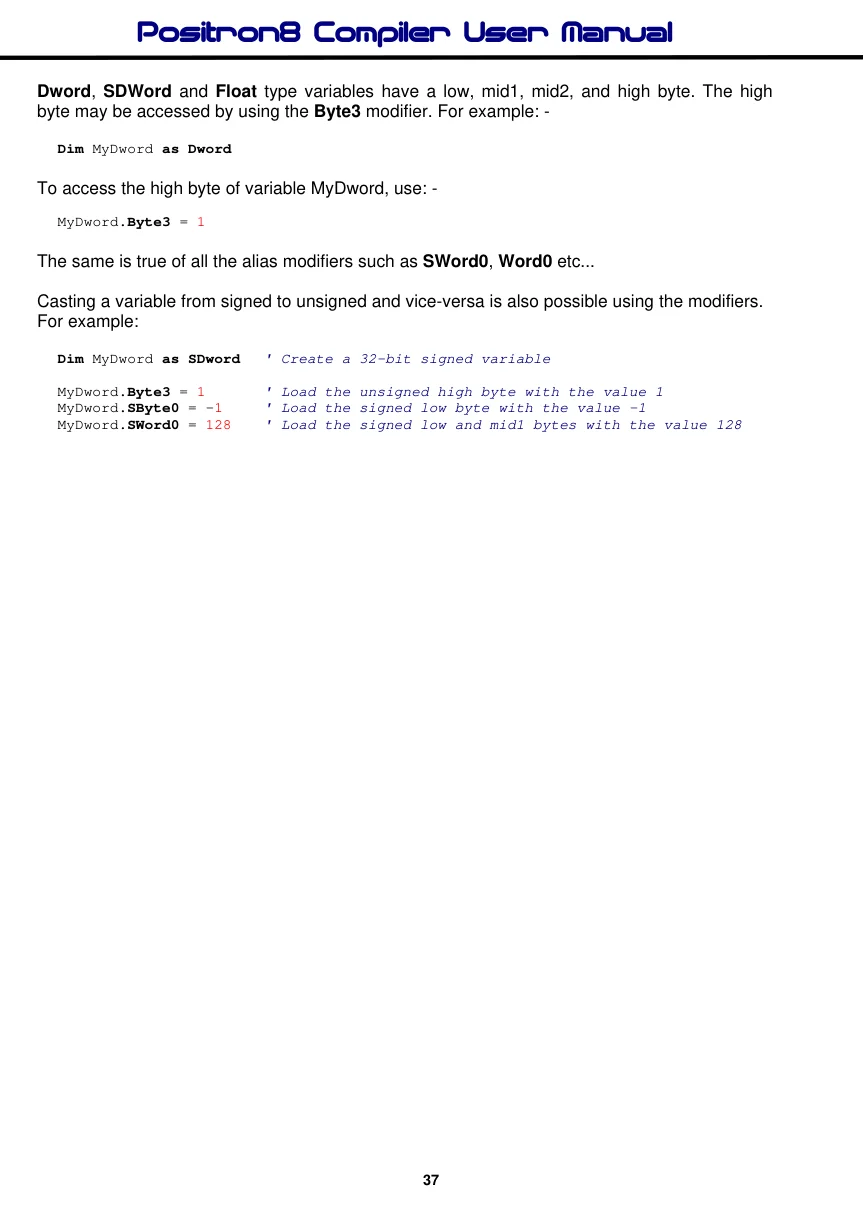
Aliases
The Symbol directive is the primary method of creating a constant, and Dim is used to create an alias to a variable. This is extremely useful for accessing the separate parts of a variable.
Dim Fido as Dog             ' Fido is another name for Dog
Dim Mouse as Rat.LowByte   ' Mouse is the first byte (low byte) of word Rat
Dim Tail as Rat.HighByte   ' Tail is the second byte(high byte) of word Rat
Dim Flea as Dog.0          ' Flea is bit-0 of Dog, which is aliased to Fido
There are modifiers that may also be used with variables. These are HighByte, LowByte, Byte0, Byte1, Byte2, Byte3, Word0, Word1, SHighByte, SLowByte, SByte0, SByte1, SByte2, SByte3, SWord0, and SWord1,
Word0, Word1, Byte2, Byte3, SWord0, SWord1, SByte2, and SByte3 may only be used in conjunction with 32-bit Dword or SDword type variables.
HighByte and Byte1 are one and the same thing, when used with a Word or SWord type variable, they refer to the unsigned High byte of a Word or SWord type variable: -
  Dim Wrd as Word        ' Create an unsigned Word variable
  Dim Wrd_Hi as Wrd.HighByte
' Wrd_Hi now represents the unsigned high byte of variable Wrd
Variable Wrd_Hi is now accessed as a Byte sized type, but any reference to it actually alters the high byte of Wrd.
SHighByte and SByte1 are one and the same thing, when used with a Word or SWord type variable, they refer to the signed High byte of a Word or SWord type variable: -
  Dim Wrd as SWord        ' Create a signed Word variable
  Dim Wrd_Hi as Wrd.SHighByte
' Wrd_Hi now represents the signed high byte of variable Wrd
Variable Wrd_Hi is now accessed as an SByte sized type, but any reference to it actually alters the high byte of Wrd.
However, if Byte1 is used in conjunction with a Dword type variable, it will extract the second byte. HighByte will still extract the high byte of the variable, as will Byte3. If SByte1 is used in conjunction with an SDword type variable, it will extract the signed second byte. SHighByte will still extract the signed high byte of the variable, as will SByte3.
The same is true of LowByte, Byte0, SLowByte and SByte0, but they refer to the unsigned or signed Low Byte of a Word or SWord type variable: -
  Dim Wrd as Word        ' Create an unsigned Word variable
  Dim Wrd_Lo as Wrd.LowByte
' Wrd_Lo now represents the low byte of variable Wrd
Variable Wrd_Lo is now accessed as a Byte sized type, but any reference to it actually alters the low byte of Wrd.
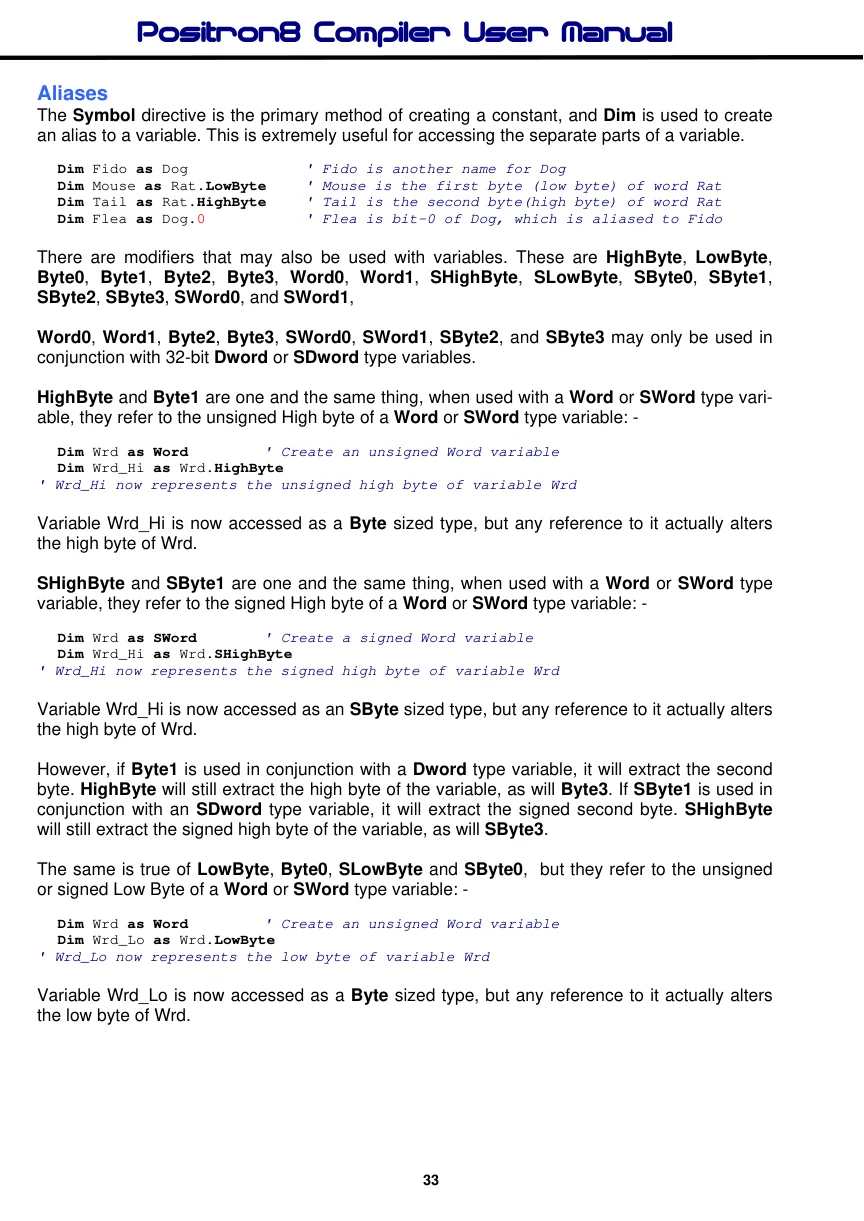
The modifier Byte2 will extract the 3rd unsigned byte from a 32-bit Dword or SDword type variable as an alias. Likewise Byte3 will extract the unsigned high byte of a 32-bit variable.
Dim Dwd as Dword        ' Create a 32-bit unsigned variable named Dwd
Dim Part1 as Dwd.Byte0  ' Alias unsigned Part1 to the low byte of Dwd
Dim Part2 as Dwd.Byte1  ' Alias unsigned Part2 to the 2nd byte of Dwd
Dim Part3 as Dwd.Byte2  ' Alias unsigned Part3 to the 3rd byte of Dwd
Dim Part4 as Dwd.Byte3  ' Alias unsigned Part3 to the high (4th) byte of Dwd
The modifier SByte2 will extract the 3rd signed byte from a 32-bit Dword or SDword type variable as an alias. Likewise SByte3 will extract the signed high byte of a 32-bit variable.
Dim sDwd as SDword        ' Create a 32-bit signed variable named sDwd
Dim sPart1 as sDwd.SByte0 ' Alias signed Part1 to the low byte of sDwd
Dim sPart2 as sDwd.SByte1 ' Alias signed Part2 to the 2nd byte of sDwd
Dim sPart3 as sDwd.SByte2 ' Alias signed Part3 to the 3rd byte of sDwd
Dim sPart4 as sDwd.SByte3 ' Alias signed Part3 to the 4th byte of sDwd
The Word0 and Word1 modifiers extract the unsigned low word and high word of a Dword or SDword type variable, and is used the same as the Byten modifiers.
Dim Dwd as Dword          ' Create a 32-bit unsigned variable named Dwd
Dim Part1 as Dwd.Word0   ' Alias unsigned Part1 to the low word of Dwd
Dim Part2 as Dwd.Word1   ' Alias unsigned Part2 to the high word of Dwd
The SWord0 and SWord1 modifiers extract the signed low word and high word of a Dword or SDword type variable, and is used the same as the SByten modifiers.
Dim sDwd as SDword          ' Create a 32-bit signed variable named sDwd
Dim sPart1 as sDwd.SWord0   ' Alias Part1 to the low word of sDwd
Dim sPart2 as sDwd.SWord1   ' Alias Part2 to the high word of sDwd
RAM space for variables is allocated within the microcontroller in the order that they are placed in the BASIC code. For example: -
Dim Var1 as Byte
Dim Var2 as Byte
Places Var1 first, then Var2: -
Var1 equ n
Var2 equ n
This means that on a device with more than one RAM Bank, the first n variables will always be in Bank0 (the value of n depends on the specific PICmicro™ used).
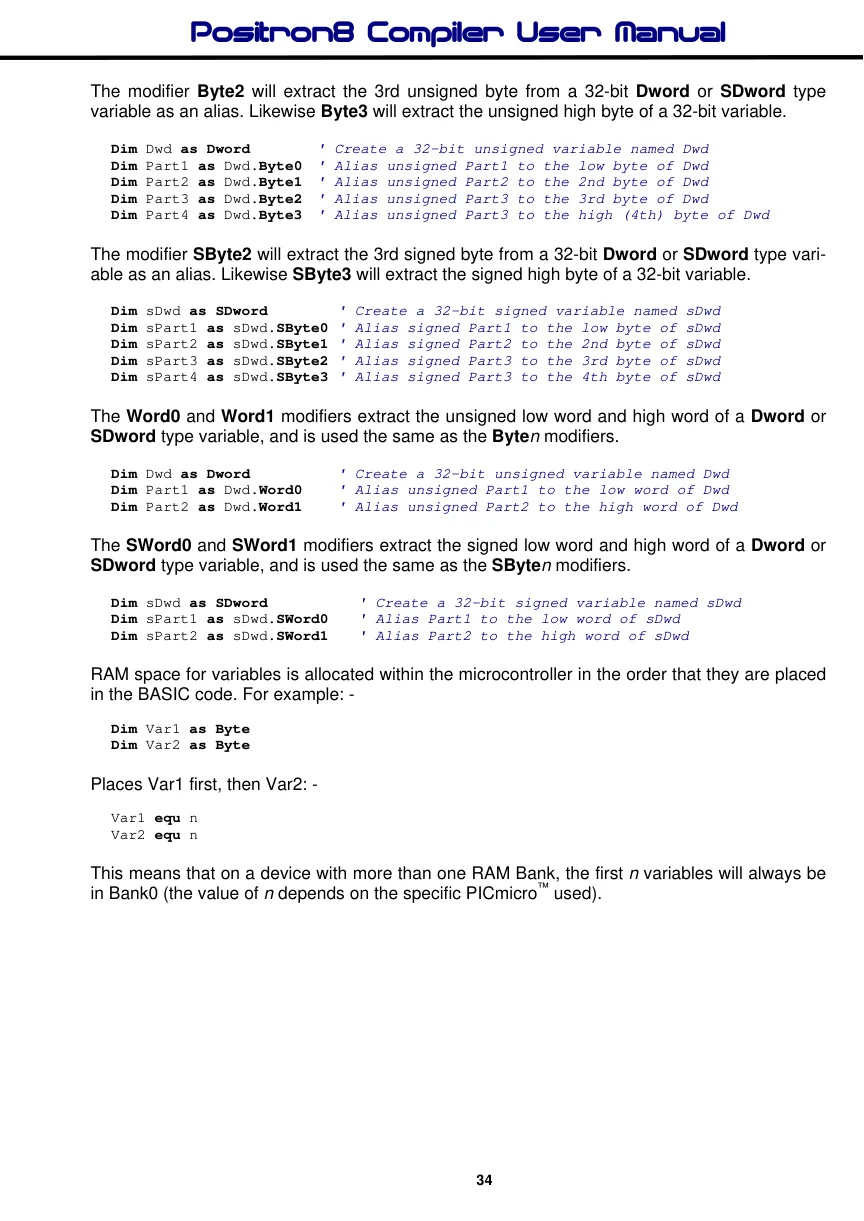
Finer points for variable handling.
The 8-bit PIC™ microcontrollers have a banking system for RAM, so, sometimes, the position of a variable can make the code smaller and run faster, and the compiler takes this into account as much as it can internally, however, it also has some directives and declares to assist the user.
Access RAM Variables.
All 18F devices have a section of RAM that is bank less and this is named Access RAM. Because it is bank less, the code using this RAM area can be less complex, so is smaller and faster to run. The compiler uses this area for its internal system variables, however, there is always parts of it left over for the user to implement. For a variable to be located in Access RAM, the directive Access can be placed after the Dim statement. For example:
Dim MyWord as Word AccessWith the above directive, the variable MyWord will be located in the microcontroller’s Access RAM area. Note that the Access RAM area of an 18F microcontroller is quite small, and usually has an area of 95 bytes, so use it only when required. A good time to use Access RAM variables is if they are being used in an interrupt handler’s routine. This will allow the interrupt code to run faster and be smaller.
On 14-bit core devices, the use of the Access directive will cause the variable to be created in low RAM, which is also, sometimes, a useful area because it may reduce the need for RAM bank changes within the compiler’s final Asm code.
Heaped Variables.
Because Array variables and String variables are usually accessed using an indirect mechanism by the compiler, the RAM bank mechanism is not always required because the enhanced 14-bit core devices and the 18F devices implement linear RAM when accessed indirectly and are bank less in operation, and the compiler uses this mechanism to its fullest whenever possible.
This means that Arrays and Strings in amongst standard variables can actually bulk up the RAM usage and cause standard variables to require more RAM bank switching within the final Assembler code produced, and cause larger code size. For this reason, the compiler allows variables to be located in, what I named, Heaped RAM, which means they are created above the standard variables. Heaped variables are created using the directive Heap after a Dim statement. For example:
Dim MyWordArray[30] as Word HeapThe above statement will create the MyWordArray array above any standard variables in the Dim list that do not have the Heap directive.
Dim MyString as String * 20 HeapThe above statement will create the MyString String variable above any standard variables in the Dim list that do not have the Heap directive.
Note. The Heap directive can also be used after standard variables if the user thinks they require it.
Variable Declares.
In order to make the finer management of variables more automatic, the compiler has a few declares. These are:
Declare Auto_Heap_Arrays = On or Off The Auto_Heap_Arrays declare will automatically place all Array variables created in a program in Higher RAM. Its default is Off for backward compatibility.
Declare Auto_Heap_Strings = On or Off The Auto_Heap_Strings declare will automatically place all String variables created in a program in Higher RAM. Its default is Off for backward compatibility.
Declare Auto_Variable_Bank_Cross = On or Off The compiler handles multi-byte variables such as Word, Long, Dword and Float crossing over a RAM bank boundary, which is where some bytes of a variable are in a differing RAM bank. However, this does cause the code produced to be a little larger because it has to bank
change more in the assembly code. This can be modified by using the
Auto_Variable_Bank_Cross declare and setting it to On. This will move any variables that are crossing RAM banks up to the beginning of the next RAM bank, however, this will increase RAM usage a little, but may produce smaller code and faster code, so it is a useful Declare to try. Its default is Off for backward compatibility.
Parts of Variable. The position of the variable within RAM Banks is usually of little importance if BASIC code is used, however, if assembler routines are being implemented, always assign any variables used within them first.
Word and SWord type variables have a low byte and a high byte. The high byte may be accessed by simply adding the letter H to the end of the variable's name. For example: -
Dim MyWord as WordWill produce the assembler code: -
MyWord equ n
MyWordH equ n
To access the high byte of variable MyWord, use: -
MyWordH = 1This is especially useful when assembler routines are being implemented, such as: -
Movlw 128
Movwf MyWordH    ' Load the high byte of MyWord with 128
Long type variables have a low, mid, and high byte. The high byte may be accessed by using Byte2. For example: -
Dim MyLong as LongTo access the high byte of variable MyLong, use: -
MyLong.Byte2 = 1
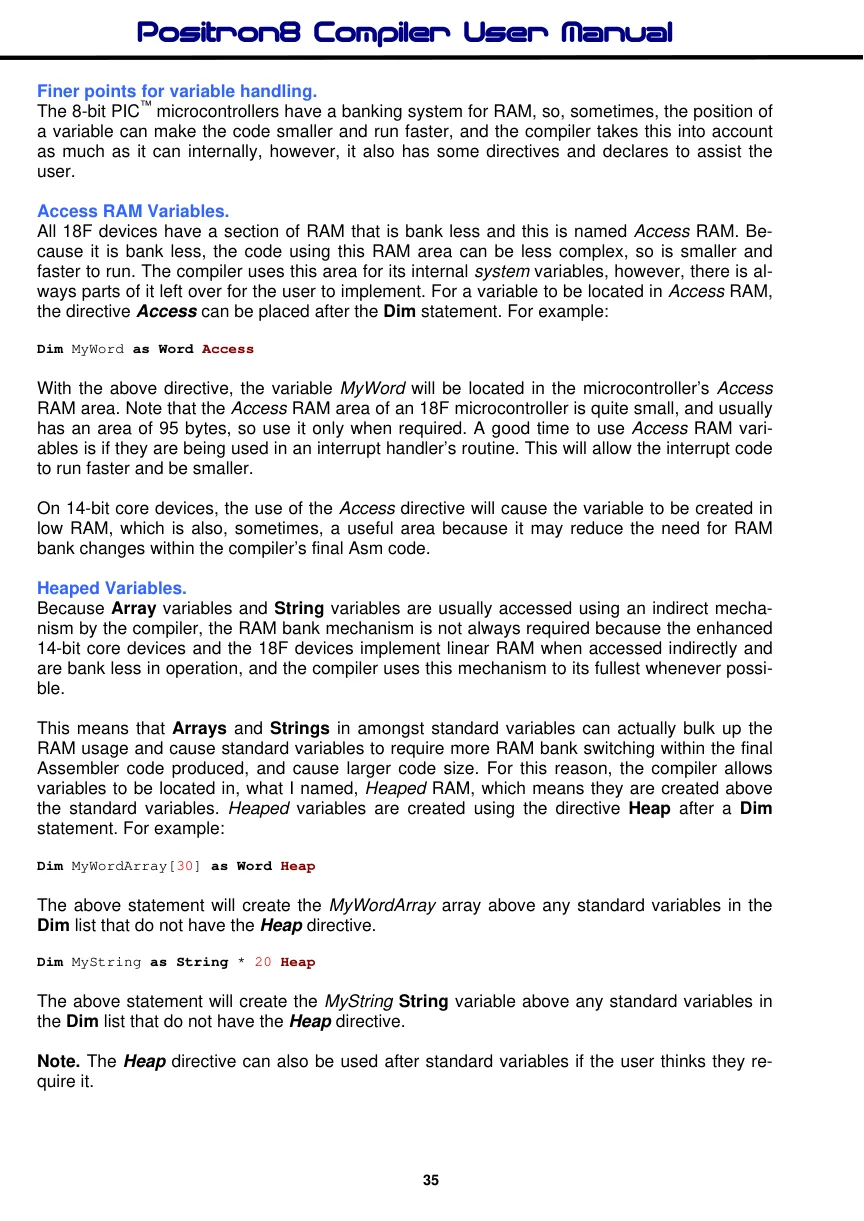
Dword, SDWord and Float type variables have a low, mid1, mid2, and high byte. The high byte may be accessed by using the Byte3 modifier. For example: -
Dim MyDword as DwordTo access the high byte of variable MyDword, use: -
MyDword.Byte3 = 1The same is true of all the alias modifiers such as SWord0, Word0 etc...
Casting a variable from signed to unsigned and vice-versa is also possible using the modifiers. For example:
Dim MyDword as SDword   ' Create a 32-bit signed variable

MyDword.Byte3 = 1      ' Load the unsigned high byte with the value 1
MyDword.SByte0 = -1   ' Load the signed low byte with the value -1
MyDword.SWord0 = 128   ' Load the signed low and mid1 bytes with the value 128