Line
Syntax
Line Pixel Colour, Xpos Start, Ypos Start, Xpos End, Ypos End
Overview
Draw a straight line in any direction on a graphic LCD.
Parameters
Pixel Colour may be a constant or variable that determines if the line will set or clear the pixels. A value of 1 will set the pixels and draw a line, while a value of 0 will clear any pixels and erase a line. If using a colour graphic LCD, this parameter holds the 16-bit colour of the pixel. Xpos Start may be a constant or variable that holds the X position for the start of the line. Can be a value from 0 to the LCD's X resolution. Ypos Start may be a constant or variable that holds the Y position for the start of the line. Can be a value from 0 to the LCD's Y resolution. Xpos End may be a constant or variable that holds the X position for the end of the line. Can be a value from 0 to the LCD's X resolution. Ypos End may be a constant or variable that holds the Y position for the end of the line. Can be a value from 0 to the LCD's Y resolution.
KS0108 graphic LCD example
' Draw a line from 0,0 to 120,34
'
  Device = 24HJ128GP502             ' Select the device to compile for
  Declare Xtal = 16
'
' LCD interface pin assignments
'
  Declare LCD_Type = KS0108         ' Setup for a KS0108 graphic LCD
  Declare LCD_DTPort = PORTB.Byte0
  Declare LCD_CS1Pin = PORTB.8
  Declare LCD_CS2Pin = PORTB.9
  Declare LCD_ENPin = PORTB.10
  Declare LCD_RSPin = PORTB.11
  Declare LCD_RWPin = PORTB.12

  Dim Xpos_Start as Byte
  Dim Xpos_End as Byte
  Dim Ypos_Start as Byte
  Dim Ypos_End as Byte
  Dim SetClr as Byte

  DelayMs 100                       ' Wait for things to stabilise
  Cls                              ' Clear the LCD
  Xpos_Start = 0
  Ypos_Start = 0
  Xpos_End = 120
  Ypos_End = 34
  SetClr = 1
  Line SetClr, Xpos_Start, Ypos_Start, Xpos_End, Ypos_End
ILI9320 colour graphic LCD example
' Demonstrate the Line and LineTo commands with a colour LCD
'
  Device = 24EP128MC202             ' Select the device to compile for
  Declare Xtal = 140.03
'
' Setup the Pins used by the ILI9320 graphic LCD
'
  Declare LCD_DTPort = PORTB.Byte0  ' Use the first 8-bits of PORTB
  Declare LCD_CSPin = PORTB.8       ' Connect to the LCD's CS pin
  Declare LCD_RDPin = PORTB.9       ' Connect to the LCD's RD pin
  Declare LCD_RSPin = PORTB.10      ' Connect to the LCD's RS pin
  Declare LCD_WRPin = PORTA.3       ' Connect to the LCD's WR pin

  Include "ILI9320.inc"             ' Load the ILI9320 routines into the program

  Dim wXpos As Word                 ' Create a variable for the X position
  Dim wYpos As Word                 ' Create a variable for the Y position

'--------------------------------------------------------------------------
Main:
' Configure the Oscillator to operate the device at 140.03MHz
'
  PLL_Setup(76, 2, 2, $0300)

  Cls clWhite                       ' Clear the LCD with the colour white
'
' Draw a series of lines
'
  For wYpos = 0 To 319
     Line clBrightBlue,0,0,239,wYpos
  Next
  For wYpos = 0 To 319
     Line clBrightRed,239,0,0,wYpos
  Next
'
' Draw a box around the LCD using LineTo
'
  DelayMs 512
  Line clBlack,1,1,238,1
  LineTo clBlack,238,318
  LineTo clBlack,1,318
  LineTo clBlack,1,1
'--------------------------------------------------------------------------
' Configure for internal 7.37MHz oscillator with PLL
' OSC pins are general purpose I/O
'
  Config FGS = GWRP_OFF, GCP_OFF
  Config FOSCSEL = FNOSC_FRCPLL, IESO_ON, PWMLOCK_OFF
  Config FOSC = POSCMD_NONE, OSCIOFNC_ON, IOL1WAY_OFF, FCKSM_CSDCMD
  Config FWDT = WDTPOST_PS256, WINDIS_OFF, PLLKEN_ON, FWDTEN_OFF
  Config FPOR = ALTI2C1_ON, ALTI2C2_OFF
  Config FICD = ICS_PGD1, JTAGEN_OFF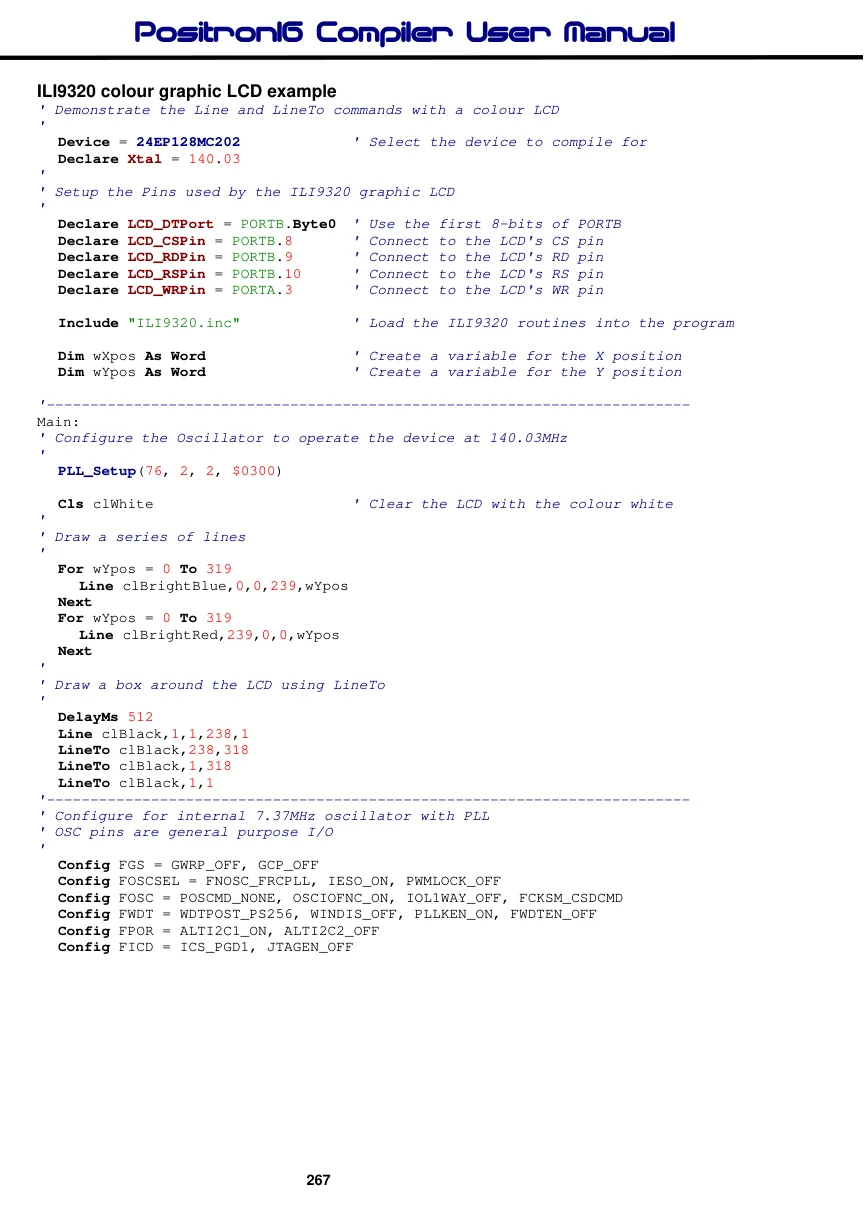
Notes.
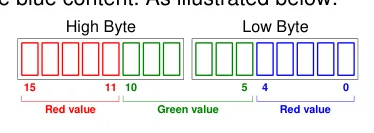
With an ILI9320 colour graphic LCD, the colour is a 16-bit value formatted in RGB565, where the upper 5-bits represent the red content, the middle 6-bits represent the green content, and
Text in this figure or table
| High Byte | Low Byte | |||
| 15 | 11 10 | 5 | 4 | 0 |
| Red value | Green value | Red value |
the lower 5-bits represent the blue content. As illustrated below:
For convenience, there are several colours defined within the ILI9320.inc file. These are:
clBlack
clBrightBlue
clBrightGreen
clBrightCyan
clBrightRed
clBrightMagenta
clBrightYellow
clBlue
clGreen
clCyan
clRed
clMagenta
clBrown
clLightGray
clDarkGray
clLightBlue
clLightGreen
clLightCyan
clLightRed
clLightMagenta
clYellow
clWhite
More constant values for colours can be added by the user if required.