Plot
Syntax
Plot Ypos, Xpos
Overview
Set an individual pixel on a graphic LCD.
Parameters
Xpos can be a constant, variable, or expression, pointing to the X-axis location of the pixel to set. This must be a value of 0 to the X resolution of the LCD. Where 0 is the far left row of pixels. Ypos can be a constant, variable, or expression, pointing to the Y-axis location of the pixel to set. This must be a value of 0 to the Y resolution of the LCD. Where 0 is the top column of pixels.
KS0108 LCD example
  Device = 24HJ128GP502             ' Select the device to compile for
  Declare Xtal = 16
'
' KS0108 graphic LCD declares
'
  Declare LCD_Type = KS0108         ' Setup for a KS0108 graphic LCD
  Declare LCD_DTPort = PORTB.Byte0
  Declare LCD_CS1Pin = PORTB.8
  Declare LCD_CS2Pin = PORTB.9
  Declare LCD_ENPin = PORTB.10
  Declare LCD_RSPin = PORTB.11
  Declare LCD_RWPin = PORTB.12

  Dim Xpos as Byte
'
' Draw a line across the LCD
'
  Do                              ' Create an infinite loop
     For Xpos = 0 to 127
       Plot 20, Xpos
       DelayMs 10
     Next
     '
     ' Now erase the line
     '
     For Xpos = 0 to 127
       UnPlot 20, Xpos
       DelayMs 10
     Next
  Loop
ILI9320 colour graphic LCD example
' Fill the LCD with colour using plot
'
  Device = 24EP128MC202               ' Select the device to compile for
  Declare Xtal = 140.03
'
' Setup the Pins used by the ILI9320 320x240 pixel graphic LCD
'
  Declare LCD_DTPort = PORTB.Byte0   ' Use the first 8-bits of PORTB
  Declare LCD_CSPin = PORTB.8         ' Connect to the LCD's CS pin
  Declare LCD_RDPin = PORTB.9        ' Connect to the LCD's RD pin
  Declare LCD_RSPin = PORTB.10        ' Connect to the LCD's RS pin
  Declare LCD_WRPin = PORTA.3         ' Connect to the LCD's WR pin

  Include "ILI9320.inc"               ' Load the ILI9320 routines into the program

  Dim wXpos As Word                   ' Create a variable for the X position
  Dim wYpos As Word                  ' Create a variable for the Y position
'--------------------------------------------------------------------------
Main:
' Configure the internal oscillator to operate the device at 140.03MHz
  PLL_Setup(76, 2, 2, $0300)

  Cls clYellow                       ' Clear the LCD with the colour yellow
  GLCD_InkColour(clBrightBlue)       ' Choose the pixel colour
'
' Fill the LCD with colour
'
  For wYpos = 0 To 319
     For wXpos = 0 To 239
       Plot wYpos, wXpos
     Next
  Next
'--------------------------------------------------------------------------
' Configure for internal 7.37MHz oscillator with PLL
' OSC pins are general purpose I/O
'
  Config FGS = GWRP_OFF, GCP_OFF
  Config FOSCSEL = FNOSC_FRCPLL, IESO_ON, PWMLOCK_OFF
  Config FOSC = POSCMD_NONE, OSCIOFNC_ON, IOL1WAY_OFF, FCKSM_CSDCMD
  Config FWDT = WDTPOST_PS256, WINDIS_OFF, PLLKEN_ON, FWDTEN_OFF
  Config FPOR = ALTI2C1_ON, ALTI2C2_OFF
  Config FICD = ICS_PGD1, JTAGEN_OFF
Notes.
If using a colour graphic LCD, the Plot command will use the current colour of the pixel's Ink. As previously set by the GLCD_Ink command.
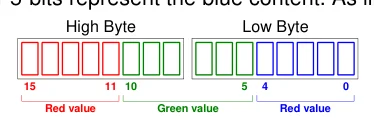
With an ILI9320 320x240 pixel colour graphic LCD, the colour is a 16-bit value formatted in RGB565, where the upper 5-bits represent the red content, the middle 6-bits represent the
Text in this figure or table
| High Byte | Low Byte | |||
| 15 | 11 10 | 5 | 4 | 0 |
| Red value | Green value | Red value |
green content, and the lower 5-bits represent the blue content. As illustrated below:


