Using an ILI9320 320x240 pixel Colour Graphic LCD
Once a colour graphic LCD has been chosen using the Declare LCD_Type directive, all Print outputs will be directed to that LCD.
The standard modifiers used by an alphanumeric LCD may also be used with the graphics LCD. Most of the previous modifiers still work in the expected manner, however, the At modifier now starts at Ypos 0 and Xpos 0, where values 0,0 will be the top left corner of the LCD. And each cursor position is pixel based. The Inverse, Xor, and Or modifiers are not available for a colour LCD.
There are two new modifiers specifically for a colour LCD. These are: -
| Ink 0 to 65535 | Choose the colour of the pixel used for a character |
| Paper 0 to 65535 | Choose the colour of the background under a character |
Once one of the new modifiers has been enabled, all future Print commands will use that particular feature until the modifier is altered, or the Ink or Paper colour is chosen by the GLCD_Ink or GLCD_Paper commands. For example: -
' Enable red characters from this point
  Print At 0, 0, Ink cBrightRed, "Hello World"
  Print At 30, 0, "Still Red"
' Now use black characters
  Print At 60, 0, Ink cBlack, "Black Characters"
If no modifiers are present, then the character's ASCII representation will be displayed: -
' Print characters A and B
  Print At 0, 0, 65, 66
The routines for the ILI9320 colour graphic LCD must be included into the program before they are used, and the declares, listed later, must be placed. The LCD routines themselves are written in Positron16 BASIC so their operation may be readily changed.
Example.
' Demonstrate the Print command with an ILI9320 colour graphic LCD
'
  Device = 24EP128MC202             ' Select the device to compile for
  Declare Xtal = 140.03
'
' Setup the Pins used by the ILI9320 graphic LCD
'
  Declare LCD_DTPort = PORTB.Byte0  ' Use the first 8-bits of PORTB
  Declare LCD_CSPin = PORTB.8       ' Connect to the LCD's CS pin
  Declare LCD_RDPin = PORTB.9       ' Connect to the LCD's RD pin
  Declare LCD_RSPin = PORTB.10      ' Connect to the LCD's RS pin
  Declare LCD_WRPin = PORTA.3       ' Connect to the LCD's WR pin

  Include "ILI9320.inc"            ' Load the ILI9320 routines into the program
'--------------------------------------------------------
Main:
' Configure the internal oscillator to operate the device at 140.03MHz
  PLL_Setup(76, 2, 2, $0300)

  Cls clWhite                       ' Clear the LCD with the colour white
  GLCD_SetFont(CourierNew_20)       ' Choose the font to use
  Print At 0,0, Ink clBrightBlue, "Hello World"

'--------------------------------------------------------
' Load the font required
  Include "CourierNew_20.inc"
'
' Configure for internal 7.37MHz oscillator with PLL
' OSC pins are general purpose I/O
'
  Config FGS = GWRP_OFF, GCP_OFF
  Config FOSCSEL = FNOSC_FRCPLL, IESO_ON, PWMLOCK_OFF
  Config FOSC = POSCMD_NONE, OSCIOFNC_ON, IOL1WAY_OFF, FCKSM_CSDCMD
  Config FWDT = WDTPOST_PS256, WINDIS_OFF, PLLKEN_ON, FWDTEN_OFF
  Config FPOR = ALTI2C1_ON, ALTI2C2_OFF
  Config FICD = ICS_PGD1, JTAGEN_OFF
Fonts can be created using the supplied program named FontCreator.exe, and can be found in the IDE's plugins folder.
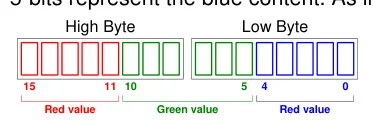
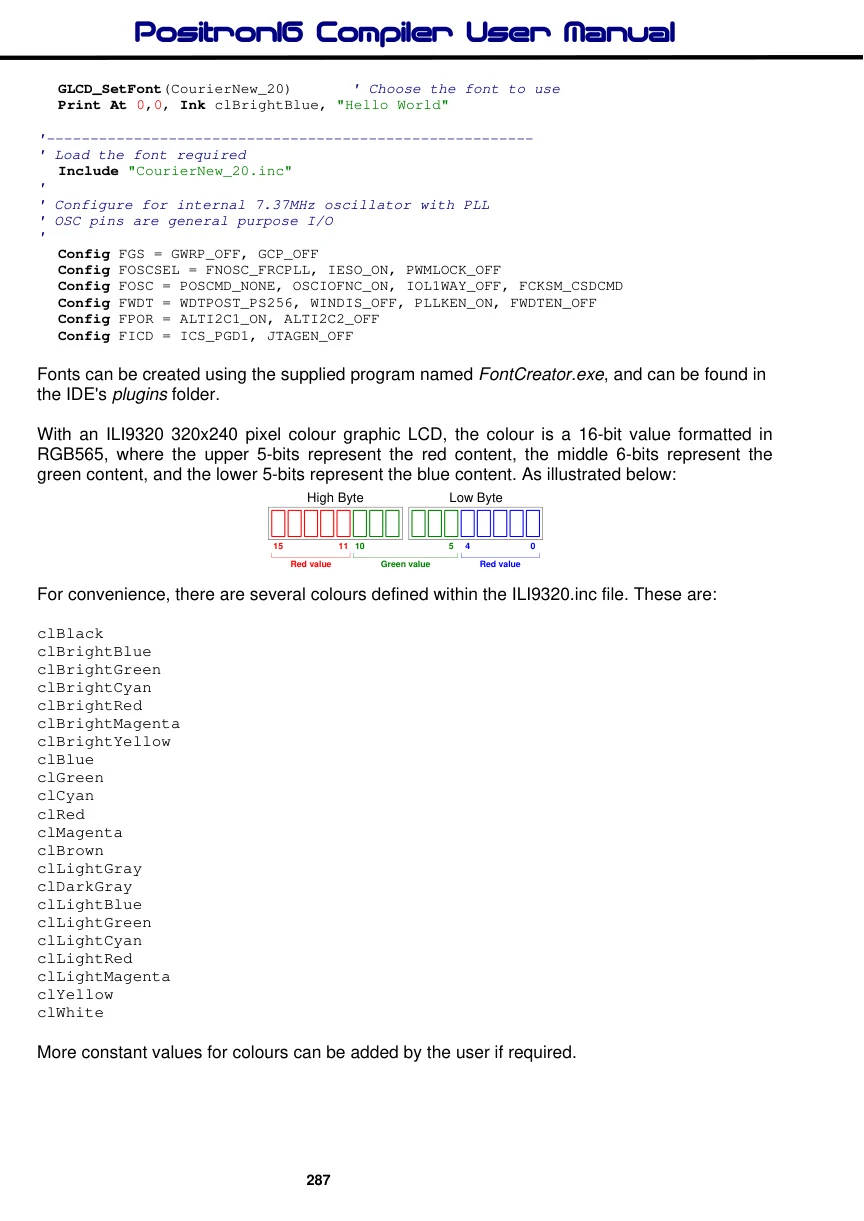
With an ILI9320 320x240 pixel colour graphic LCD, the colour is a 16-bit value formatted in RGB565, where the upper 5-bits represent the red content, the middle 6-bits represent the
Text in this figure or table
| High Byte | Low Byte | |||
| 15 | 11 10 | 5 | 4 | 0 |
| Red value | Green value | Red value |
green content, and the lower 5-bits represent the blue content. As illustrated below:
For convenience, there are several colours defined within the ILI9320.inc file. These are:
clBlack
clBrightBlue
clBrightGreen
clBrightCyan
clBrightRed
clBrightMagenta
clBrightYellow
clBlue
clGreen
clCyan
clRed
clMagenta
clBrown
clLightGray
clDarkGray
clLightBlue
clLightGreen
clLightCyan
clLightRed
clLightMagenta
clYellow
clWhite
More constant values for colours can be added by the user if required.
Text in this figure or table
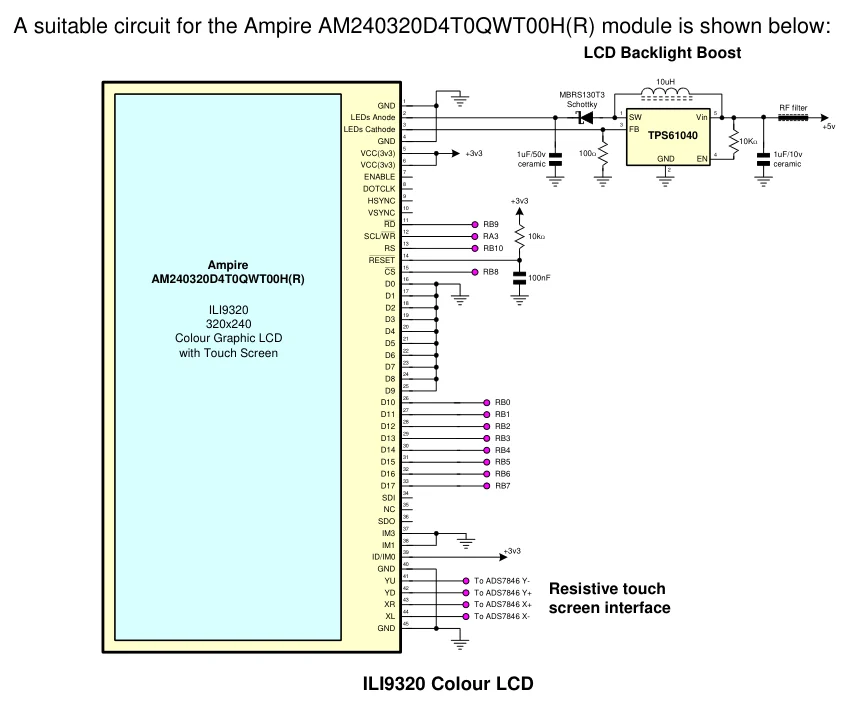
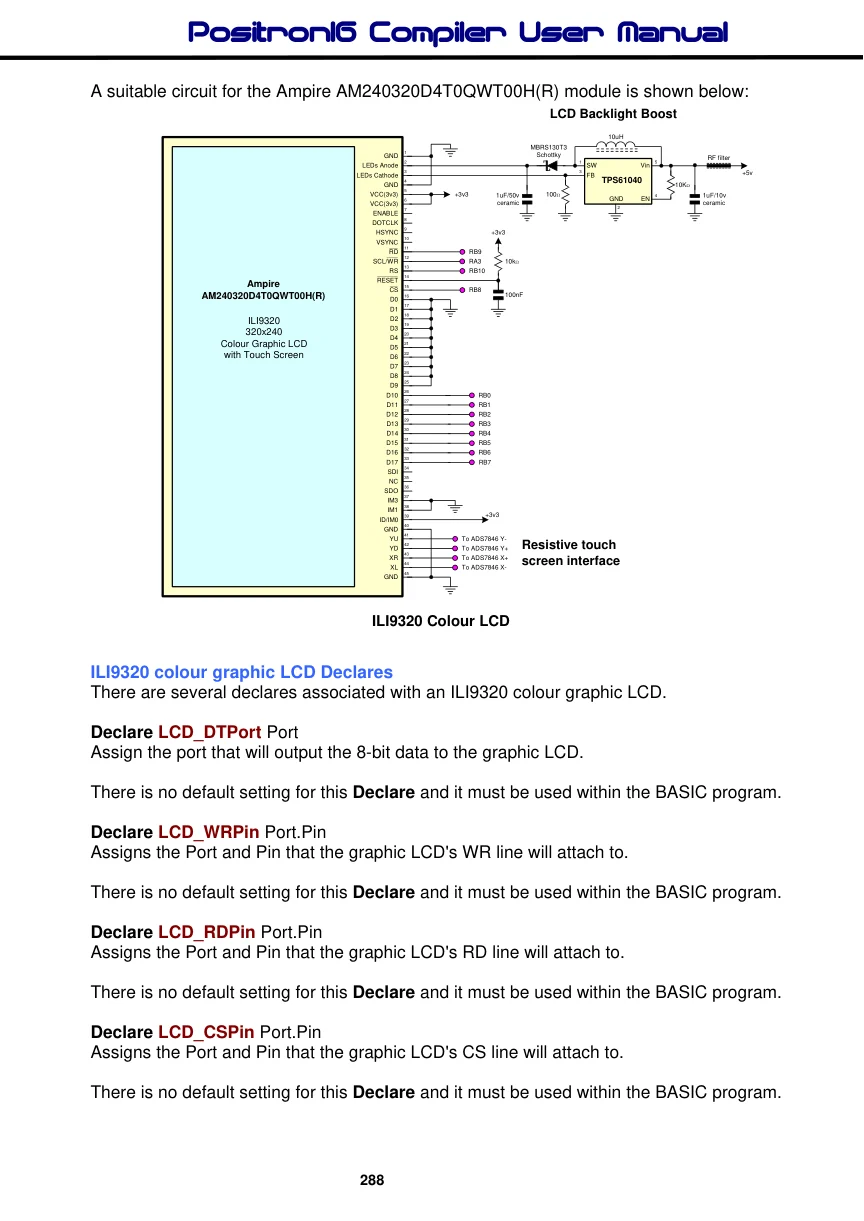
A suitable circuit for the Ampire AM240320D4T0QWT00H(R) module is shown below: LCD Backlight Boost
10uH MBRS130T3
| 1 | Schottky | |
| GND | RF filter | |
| 2 | 1 | 5 |
| LEDs Anode | SW | Vin |
| 3 | 3 | +5v |
| LEDs Cathode | FB | |
| 4 | TPS61040 | |
| GND | 10KΩ |
5
| VCC(3v3) | +3v3 | 1uF/50v | 100Ω | 4 | 1uF/10v |
| GND | EN |
6
VCC(3v3) ceramic ceramic
2 7 ENABLE 8 DOTCLK 9
HSYNC +3v3
10 VSYNC 11
RD RB9
12
SCL/WR RA3 10kΩ
13
RS RB10
14 RESET
| Ampire | 15 |
| CS | RB8 |
100nF
AM240320D4T0QWT00H(R) 16
D0 17 D1 18 D2
ILI9320 19
D3
320x240 20
D4 21
Colour Graphic LCD D5
22
with Touch Screen D6
23 D7 24 D8 25 D9 26
D10 RB0
27
D11 RB1
28
D12 RB2
29
D13 RB3
30
D14 RB4
31
D15 RB5
32
D16 RB6
33
D17 RB7
34 SDI 35 NC 36 SDO 37 IM3 38 IM1
39 +3v3
ID/IM0 40 GND 41
| YU | To ADS7846 Y- |
| 42 | Resistive touch |
| YD | To ADS7846 Y+ |
43
| XR | To ADS7846 X+ |
| 44 | screen interface |
| XL | To ADS7846 X- |
45 GND
ILI9320 Colour LCD
ILI9320 colour graphic LCD Declares
There are several declares associated with an ILI9320 colour graphic LCD.
Declare LCD_DTPort Port Assign the port that will output the 8-bit data to the graphic LCD.
There is no default setting for this Declare and it must be used within the BASIC program.
Declare LCD_WRPin Port.Pin Assigns the Port and Pin that the graphic LCD's WR line will attach to.
There is no default setting for this Declare and it must be used within the BASIC program.
Declare LCD_RDPin Port.Pin Assigns the Port and Pin that the graphic LCD's RD line will attach to.
There is no default setting for this Declare and it must be used within the BASIC program.
Declare LCD_CSPin Port.Pin Assigns the Port and Pin that the graphic LCD's CS line will attach to.
There is no default setting for this Declare and it must be used within the BASIC program.
Declare LCD_RSPin Port.Pin Assigns the Port and Pins that the graphic LCD's RS line will attach to.
There is no default setting for this Declare and it must be used within the BASIC program.
Declare LCD_RSTPin Port.Pin Assigns the Port and Pin that the graphic LCD's RST line will attach to.
The LCD’s RST (Reset) Declare is optional and if omitted from the BASIC code the compiler will not manipulate it. However, if not used as part of the interface, you must set the LCD’s RST pin high for normal operation.
Note.
The ILI9320 graphic LCD is a “non-intelligent” type, therefore, a separate character set is required. This is held internally in code memory and is chosen by issuing the GLCD_SetFont(pFont) command.
