Toshiba_UDG
Syntax
Toshiba_UDG Character, [Value {, Values } ]
Overview
Create User Defined Graphics for a Toshiba T6963 graphic LCD.
Parameters
Character can be a constant, variable, or expression, that contains the character to define. User defined characters start from 160 to 255. Value\s is a list of constants, variables, or expressions, that contain the information to build the User Defined character. There are also some modifiers that can be used in order to access UDG data from various tables.
Example
' Toshiba T6963C UDG (User Defined Graphics) demo
'
  Device = 24FJ64GA002                  ' Select the device to compile for
  Declare Xtal = 16
'
' Toshiba T6963C graphic LCD Pin configuration
'
  Declare LCD_Type = Toshiba            ' LCD's type is Toshiba T6963C
  Declare LCD_DTPort = PORTB.Byte0      ' The LCD's 8-bit Data port
  Declare LCD_WRPin = PORTB.12          ' The LCD's WR pin
  Declare LCD_RDPin = PORTB.11          ' The LCD's RD pin
  Declare LCD_CEPin = PORTB.10         ' The LCD's CE pin
  Declare LCD_CDPin = PORTB.8          ' The LCD's CD pin
  Declare LCD_RSTPin = PORTB.9         ' The LCD's RST pin (optional)
'
' Toshiba T6963C graphic LCD setup configuration
'
  Declare LCD_Font_Width = 8           ' The font width ( 6 or 8)
  Declare LCD_X_Res = 128              ' The X resolution of the LCD
  Declare LCD_Y_Res = 64                ' The Y resolution of the LCD
  Declare LCD_Text_Home_Address = 0    ' The home address of the LCD
  Declare LCD_RAM_Size = 8192           ' The amount of RAM the LCD contains
  Declare LCD_Text_Pages = 2           ' The amount of text pages required

  Include "T6963C.inc"    ' Load the Toshiba T6963C routines into the program

'--------------------------------------------------------------------------
Main:
  Dim UDG_Array[10] As Byte = $18, $18, $99, $DB, $7E, $3C, $18, $18
  Dim UDG_Code As Code = $30, $18, $0C, $FF, $FF, $0C, $18, $30

  Cls Text                                        ' Clear Text RAM
'
' Print the user defined graphic characters 160, 161 and 162 on the LCD
'
  Print At 1,0,"Char 160 = ",160,_
        At 2,0,"Char 161 = ",161,_
        At 3,0,"Char 162 = ",162
'
' Create the UDG (User Defined Graphics) for three characters
'
  Toshiba_Udg 160,[UDG_Code\8]
  Toshiba_Udg 161,[Str UDG_Array\8]
  Toshiba_Udg 162,[$0C, $18, $30, $FF, $FF, $30, $18, $0C]
Notes.
User Defined Graphic values can be stored in code memory, and retrieved by the use of a label name associated with the Dim as Code table:
Dim UDG_2 as Code = $30, $18, $0C, $FF, $FF, $0C, $18, $30

Toshiba_UDG 161, [UDG_2\8]
The use of the Str modifier will retrieve values stored in an array, however, this is not recommended as it will waste precious RAM.
The Toshiba LCD’s font is designed in an 8x8 grid or a 6x8 grid depending on the font size chosen. The diagram below shows a designed character and its associated values.
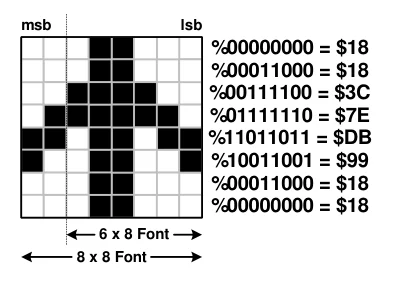
Text in this figure or table
msb lsb
%00000000 = $18 %00011000 = $18 %00111100 = $3C %01111110 = $7E %11011011 = $DB %10011001 = $99 %00011000 = $18 %00000000 = $18 6 x 8 Font 8 x 8 Font
See also : LCDRead, LCDWrite, Pixel, Plot, Toshiba_Command, UnPlot.
