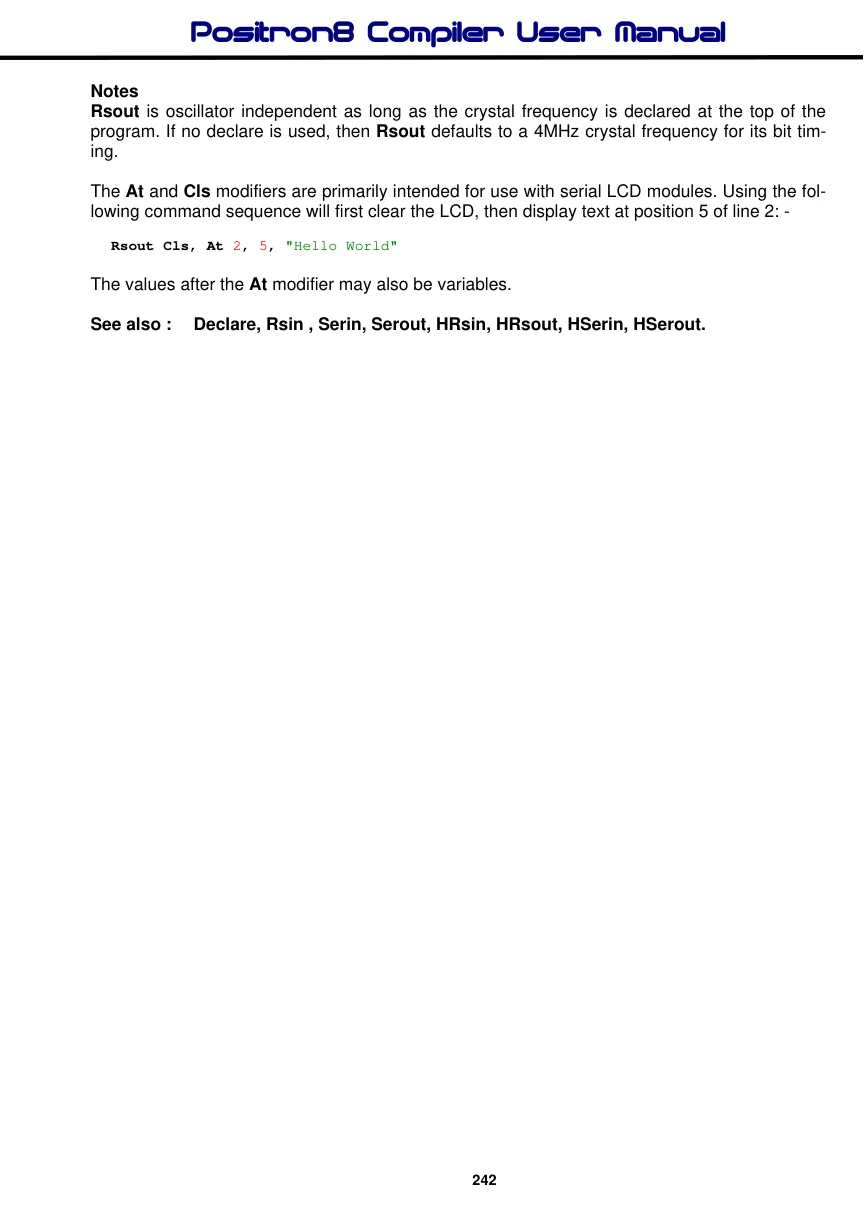
Rsout
Syntax
Rsout Item {, Item... }
Overview
Send one or more Items to a predetermined pin at a predetermined Baud rate in standard asynchronous format using 8 data bits, no parity and 1 stop bit (8N1). The pin is automatically made an output.
Parameters
Item may be a constant, variable, expression, or string list. There are no operators as such, instead there are modifiers. For example, if an at sign'@' precedes an Item, the ASCII representation for each digit is transmitted.
The modifiers are listed below: -
Modifier Operation
At ypos,xpos Position the cursor on a serial LCD
| Cls | Clear a serial LCD (also creates a 30ms delay) |
| Bin{1..32} | Send binary digits |
| Dec{0..10} | Send decimal digits (amount of digits after decimal point with floating point) |
| Hex{1..8} | Send hexadecimal digits |
| Sbin{1..32} | Send signed binary digits |
| Sdec{0..10} | Send signed decimal digits |
| Shex{1..8} | Send signed hexadecimal digits |
| Ibin{1..32} | Send binary digits with a preceding '%' identifier |
| Idec{0..10} | Send decimal digits with a preceding '#' identifier |
| Ihex{1..8} | Send hexadecimal digits with a preceding '$' identifier |
| ISbin{1..32} | Send signed binary digits with a preceding '%' identifier |
| ISdec{0..10} | Send signed decimal digits with a preceding '#' identifier |
| IShex{1..8} | Send signed hexadecimal digits with a preceding '$' identifier |
| Rep c\n | Send character c repeated n times |
| Str array\n | Send all or part of an array |
| Cstr cdata | Send string data defined in a Cdata statement. |
The numbers after the Bin, Dec, and Hex modifiers are optional. If they are omitted, then the default is all the digits that make up the value will be displayed.
If a floating point variable is to be displayed, then the digits after the Dec modifier determine how many remainder digits are send. i.e. numbers after the decimal point.
Dim MyFloat as Float
MyFloat = 3.145
Rsout Dec2 MyFloat   ' Send 2 values after the decimal point
The above program will send 3.14
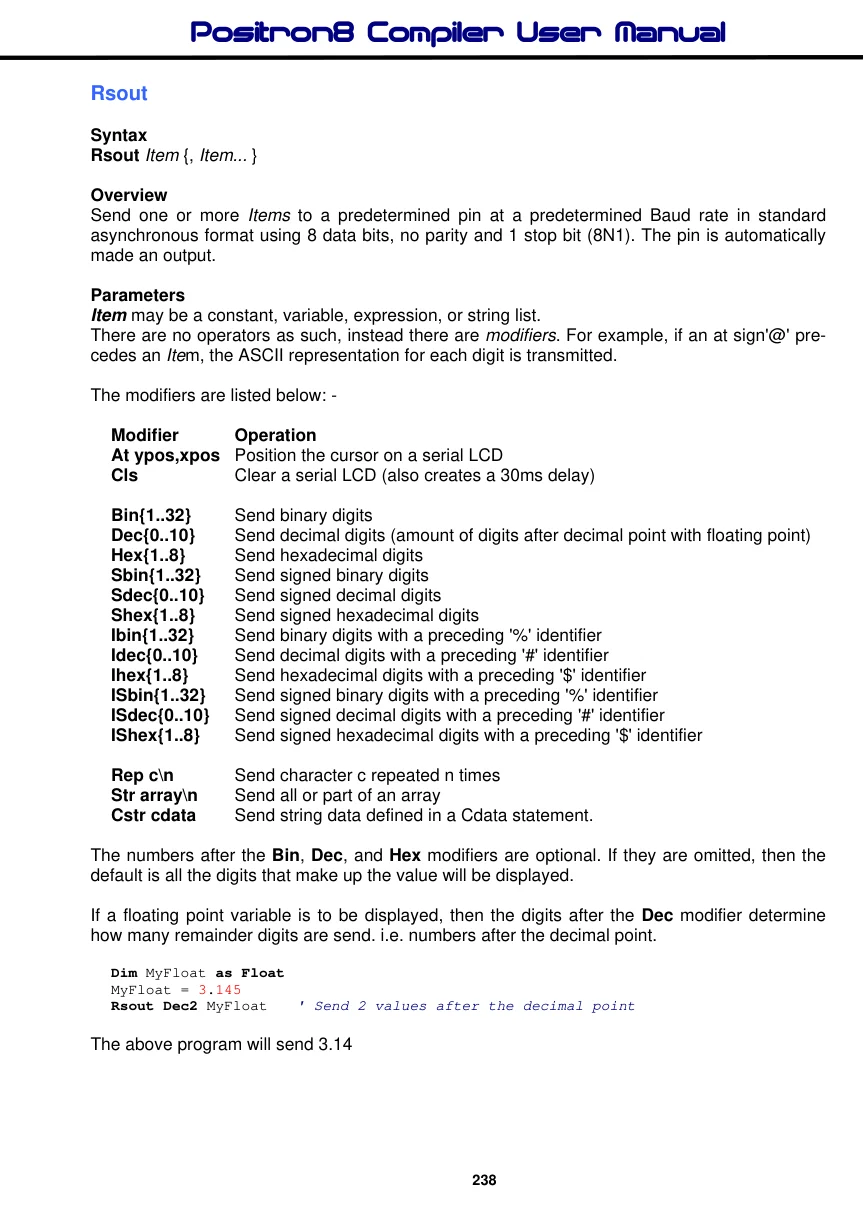
If the digit after the Dec modifier is omitted, then 3 values will be displayed after the decimal point.
Dim MyFloat as Float
MyFloat = 3.1456
Rsout Dec MyFloat   ' Send 3 values after the decimal point
The above program will send 3.145
There is no need to use the Sdec modifier for signed floating point values, as the compiler's Dec modifier will automatically display a minus result: -
Dim MyFloat as Float
MyFloat = -3.1456
Rsout Dec MyFloat   ' Send 3 values after the decimal point
The above program will send -3.145
Hex or Bin modifiers cannot be used with floating point values or variables.
The Xpos and Ypos values in the At modifier both start at 1. For example, to place the text "Hello World" on line 1, position 1, the code would be: -
Rsout At 1, 1, "Hello World"Example 1
  Device = 18F25K20
  Declare Xtal = 20  ' Tell the compiler the device will be operating at 20MHz

  Dim bVar1 as Byte
  Dim wWrd as Word
  Dim dDwd as Dword

   Rsout "Hello World"      ' Display the text "Hello World"
   Rsout "Var1= ", Dec bVar1 ' Display the decimal value of bVar1
   Rsout "Var1= ", Hex bVar1 ' Display the hexadecimal value of bVar1
   Rsout "Var1= ", Bin bVar1 ' Display the binary value of bVar1
   Rsout "Dwd= ", Hex6 dDwd  ' Display 6 hex characters of a Dword variable
Example 2
' Display a negative value on a serial LCD.
  Symbol cNegative = -200
  Rsout At 1, 1, SDec cNegative
Example 3
' Display a negative value on a serial LCD with a preceding identifier.
  Rsout At 1, 1, IShex -$1234
Example 3 will produce the text "$-1234" on the LCD.
Some PICmicros such as the 16F87x, and 18FXXX range have the ability to read and write to their own flash memory. And although writing to this memory too many times is unhealthy for the PICmicro™, reading this memory is both fast, and harmless. Which offers a unique form of data storage and retrieval, the Cdata command proves this, as it uses the mechanism of reading and storing in the PICmicro's flash memory.
Combining the unique features of the ‘self modifying PICmicro's' with a string format, the compiler is capable of reducing the overhead of printing, or transmitting large amounts of text data.
The Cstr modifier may be used in commands that deal with text processing i.e. Serout, HRsout, and Print etc.
The Cstr modifier is used in conjunction with the Cdata directive or the Dim as Flash directive. The Cdata command is used for initially creating the string of characters: -
String1: Cdata "Hello World", 0Or
Dim String1 as Flash8 = "Hello World", 0The above lines of code will create, in flash memory, the values that make up the ASCII text "Hello World", at address String1. Note the null terminator after the ASCII text.
Null terminated means that a zero (null) is placed at the end of the string of ASCII characters to signal that the string has finished.
To display, or transmit this string of characters, the following command structure could be used:
Rsout Cstr String1The label that declared the address where the list of flash memory values resided, now becomes the string's name. In a large program with lots of text formatting, this type of structure can save quite literally hundreds of bytes of valuable code space.
The term 'virtual string' relates to the fact that a string formed from the Cdata command cannot be written too, but only read from.
The Str modifier is used for sending a string of bytes from a Byte array variable. A string is a set of bytes sized values that are arranged or accessed in a certain order.

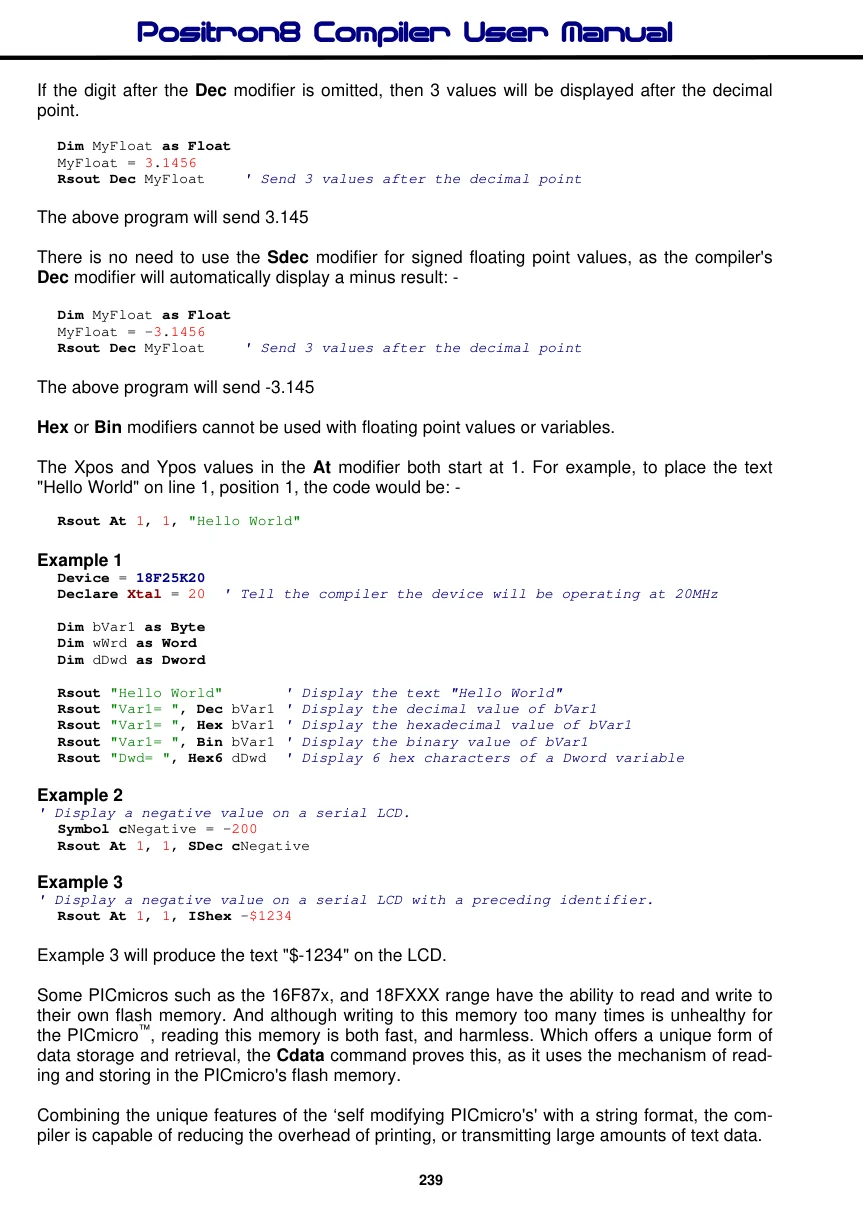
The values 1, 2, 3 would be stored in a string with the value 1 first, followed by 2 then followed by the value 3. A Byte array is a similar concept to a string; it contains data that is arranged in a certain order. Each of the elements in an array is the same size. The string 1,2,3 would be stored in a Byte array containing three bytes (elements).
Below is an example that displays five bytes (from a Byte array): -
 Dim MyArray[10] as Byte = "HELLO"  ' Create a 10 element array, pre-load it
 Rsout Str MyArray\5     ' Send 5-byte string.
The above example, has exactly the same function as the previous one. The only difference is that the string is now constructed using Str as a command instead of a modifier.
Declares
There are several Declares for use with Rsout. These are : -
Declare Rsout_Pin = Port.Pin Assigns the Port and Pin that will be used to output serial data from the Rsout command. This may be any valid port on the PICmicro™.
Declare Rsout_Mode = Inverted or True/False or 1, 0 Sets the serial mode for the data transmitted by Rsout. This may be inverted or true. Alternatively, a value of 1 may be substituted to represent inverted, and 0 for true.
If the Declare is not used in the program, then the default mode is Inverted.
Declare Serial_Baud = 0 to 65535 bps (Baud) Informs the Rsin and Rsout routines as to what Baud rate to receive and transmit data.
Virtually any Baud rate may be transmitted and received, but there are standard Bauds: -
300, 600, 1200, 2400, 4800, 9600, and 19200.
When using a 4MHz crystal, the highest Baud rate that is reliably achievable is 9600. However, an increase in the oscillator speed allows higher Baud rates to be achieved, including 38400 Baud.
If the Declare is not used in the program, then the default Baud is 9600.
Declare Rsout_Pace = 0 to 65535 microseconds (us) Implements a delay between characters transmitted by the Rsout command.
On occasion, the characters transmitted serially are in a stream that is too fast for the receiver to catch, this results in missed characters. To alleviate this, a delay may be implemented between each individual character transmitted by Rsout.
If the Declare is not used in the program, then the default is no delay between characters.
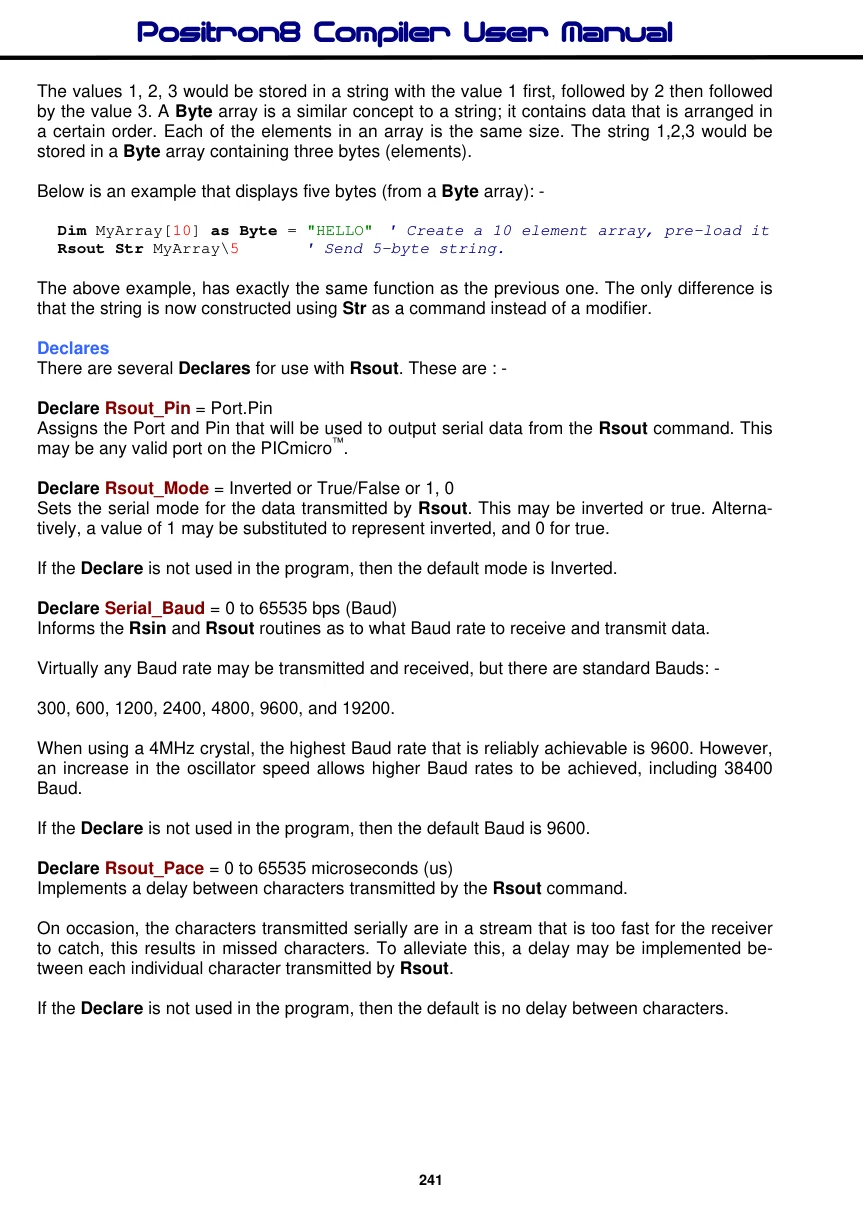
Notes
Rsout is oscillator independent as long as the crystal frequency is declared at the top of the program. If no declare is used, then Rsout defaults to a 4MHz crystal frequency for its bit timing.
The At and Cls modifiers are primarily intended for use with serial LCD modules. Using the following command sequence will first clear the LCD, then display text at position 5 of line 2: -
Rsout Cls, At 2, 5, "Hello World"The values after the At modifier may also be variables.
See also : Declare, Rsin , Serin, Serout, HRsin, HRsout, HSerin, HSerout.